RTO Vehicle Information App – Vehicle Number Search Guide
Searching for vehicle details using a registration number has become much easier with mobile-based services. An RTO Vehicle Information App can help users check available vehicle information directly from a smartphone by entering the vehicle number.
This can be useful for car owners, bike owners, second-hand vehicle buyers and anyone who wants to verify basic registration-related information. Depending on the service and available records, users may be able to check RC details, vehicle class, registration status, insurance validity, fitness information, permit details, PUC-related information and challan status.
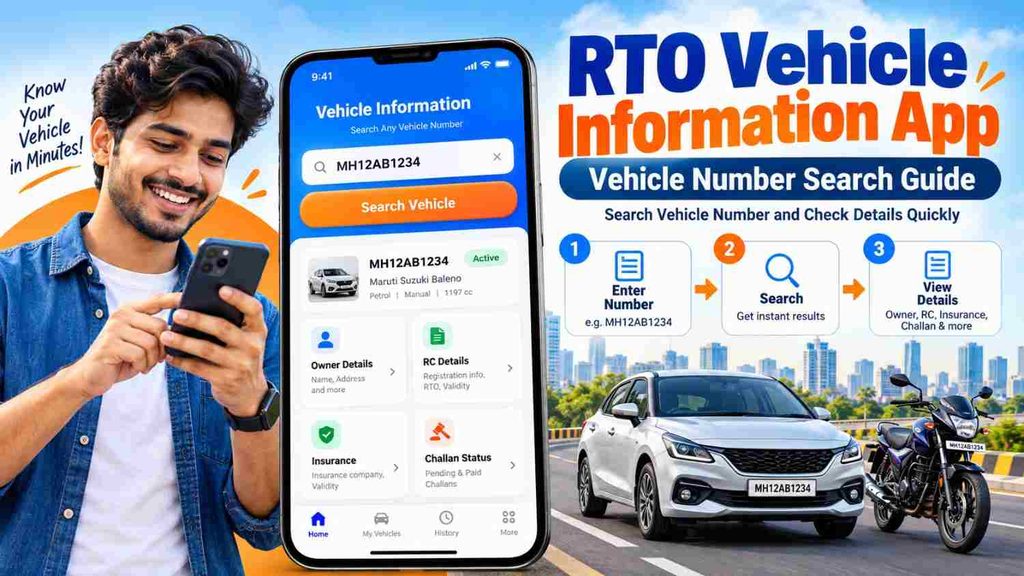
This Vehicle Number Search Guide explains how an RTO Vehicle Information App works, what information you may find and what you should verify before relying on the displayed details.
What Is Vehicle Number Search?
Vehicle number search means using a vehicle’s registration number to find available registration and transport-related information.
Every registered vehicle has a unique registration number displayed on its number plate.
For example:
WB20AB1234
MH12XY5678
KA01CD9876
The registration number generally includes a state or union territory code, RTO-related code and unique vehicle identification series.
By entering this number into a suitable vehicle information service, users can search for available records related to that vehicle.
What Is an RTO Vehicle Information App?
An RTO Vehicle Information App is a digital service designed to help users access available information connected with a registered vehicle.
Instead of checking multiple physical documents every time, users can search with the registration number and review available information from their phone.
Depending on the platform and records available, the app may provide information related to:
- Vehicle registration
- RC status
- Vehicle class
- Fuel type
- Make and model
- Registration date
- Insurance validity
- Fitness validity
- Permit details
- PUC information
- Road tax-related details
- Pending challans
The exact information shown can vary depending on the vehicle, location and service being used.
RTO Vehicle Information App – Vehicle Search Overview
| Vehicle Detail | Information You May Find |
|---|---|
| Registration Number | Vehicle’s registered number |
| Registration Status | Available RC or registration status |
| Registration Date | Date of registration |
| Vehicle Class | Car, motorcycle, scooter, commercial vehicle, etc. |
| Fuel Type | Petrol, diesel, CNG, electric or other |
| Make & Model | Available manufacturer and model details |
| Insurance | Available insurance validity information |
| Fitness | Fitness validity where applicable |
| Permit | Permit information for relevant vehicles |
| PUC | Available pollution certificate-related details |
| Challan | Pending traffic challan information through supported services |
This information can be especially useful when verifying a used vehicle.
How to Search Vehicle Details by Number
Searching vehicle information by number is usually simple.
Step 1: Open a Reliable RTO Vehicle Information Service
Start by opening a reliable vehicle information app or mobile service.
For important document verification, prefer an official or trusted platform.
Avoid downloading unknown APK files that claim to provide confidential vehicle or owner information.
Step 2: Select Vehicle Search
Look for an option such as:
- Vehicle Search
- RC Search
- Vehicle Details
- Registration Search
- Vehicle Information
Open the relevant section.
Step 3: Enter the Vehicle Number
Type the complete registration number carefully.
For example:
DL01AB1234
Make sure every letter and number is correct.
A typing mistake can result in no record or incorrect vehicle information.
Step 4: Complete Verification
Some services may ask you to complete:
- CAPTCHA
- OTP verification
- Mobile number verification
- Login
- Security verification
Complete these steps only when using a trusted service.
Step 5: View Vehicle Information
Once the search is complete, available vehicle information may appear on your screen.
Review details such as:
- Registration status
- Vehicle category
- Fuel type
- Insurance validity
- Fitness
- Permit
- Registration date
Step 6: Compare With Original Documents
If you are checking a used car or bike, compare the displayed information with the documents provided by the seller.
Do not rely only on the mobile screen for an important purchase.
How to Check RC Details by Vehicle Number
The Registration Certificate, commonly called RC, is an important document associated with a registered vehicle.
To check available RC information:
- Open the vehicle information app.
- Enter the registration number.
- Complete the required verification.
- Open the registration details.
- Review available RC information.
You may find details related to registration status, vehicle category, registration date and other records.
If you are buying a used vehicle, compare the digital information with the physical or digital RC shown by the seller.
How to Check Vehicle Insurance by Number
Vehicle insurance status is another important detail users may want to verify.
Depending on the service, available insurance validity information may be linked with the registration number.
To check:
- Search the vehicle number.
- Open the vehicle details.
- Find the insurance section.
- Check the available validity or expiry information.
For complete insurance information such as coverage, premium, IDV, add-ons and exclusions, check the actual policy document.
Vehicle information apps are mainly useful for quick status verification.
How to Check Challan Status by Vehicle Number
Pending traffic challans can sometimes be checked using the vehicle registration number through supported challan services.
A user may need to enter:
- Vehicle number
- Challan number
- Driving licence details
If a challan is available, carefully review:
- Challan date
- Offence
- Payment status
- Amount
- Other available details
Use a trusted service before making any payment.
Avoid suspicious messages asking you to pay an urgent challan through an unknown link.
Why Is Vehicle Number Search Useful?
Vehicle number search can be helpful in many situations.
Used Car Verification
Before buying a second-hand car, you can check available registration, insurance and other vehicle-related information.
Used Bike Verification
Vehicle number search can also help when purchasing a motorcycle or scooter.
Insurance Check
Owners may use vehicle search to check available insurance validity before renewal.
RC Verification
Users can compare available RC information with their actual documents.
Challan Check
A vehicle number can help users look for available pending traffic challans through relevant services.
Document Management
Vehicle owners can quickly review important information before travel, renewal, sale or transfer.
Vehicle Number Search Before Buying a Used Car
A used car purchase should involve proper verification.
Before making payment, search the vehicle number and check available information related to:
- Registration
- RC status
- Insurance
- Pending challans
- Fitness where applicable
- PUC
- Vehicle category
- Registration date
Then compare the results with the seller’s documents.
Also inspect:
- Original RC
- Insurance policy
- PUC certificate
- Chassis details
- Service history
- Ownership transfer paperwork
- Physical condition of the car
A vehicle number search is useful, but it should be only one part of the buying process.
Vehicle Number Search Before Buying a Used Bike
Second-hand bike buyers should also perform basic verification.
Before final payment, check:
- Registration status
- Vehicle model
- Insurance validity
- Pending challans
- PUC information
- RC details
- Ownership documents
Also make sure the chassis and other identification details match the documents.
This can reduce the chances of document-related problems after the purchase.
Important Details to Verify After a Vehicle Search
Once the search result appears, do not just look at one field.
Review the details carefully.
Registration Status
Check whether the available registration information appears valid.
Vehicle Class
Make sure the vehicle category matches the actual vehicle.
For example, a motorcycle should not appear as a different vehicle category.
Fuel Type
Check whether the displayed fuel type matches the vehicle.
Registration Date
This can help estimate the age of the vehicle.
Insurance Validity
Check whether the available insurance information appears current.
Fitness Details
Fitness information can be particularly important for commercial vehicles.
Pending Challans
Outstanding challans should be reviewed before a used vehicle transaction.
Common Problems During Vehicle Number Search
Sometimes the expected information may not appear.
Common reasons include:
- Incorrect registration number
- Temporary server issue
- Slow internet connection
- Database update delay
- Recently renewed insurance not yet reflected
- Old vehicle records
- Limited availability of certain details
- App maintenance
Check the registration number again before trying another search.
If the information is important for a purchase or transfer, verify it using another trusted source or original documents.
Safety Tips While Searching Vehicle Details
Vehicle number search is convenient, but users should remain careful while using online services.
Follow these basic safety tips:
- Use trusted vehicle information services.
- Avoid unknown APK files.
- Never share your OTP with unknown people.
- Do not share banking passwords.
- Verify the payment page before paying a challan.
- Avoid services claiming to reveal confidential personal information.
- Compare important details with original documents.
- Do not make a used vehicle payment based only on an app search.
These precautions can help protect your personal and financial information.
Frequently Asked Questions
1. Can I search vehicle details using the registration number?
Yes. Vehicle information services generally allow users to search available vehicle records using the registration number.
2. What details can I find through a vehicle number search?
Depending on available records, you may find registration information, RC status, vehicle class, fuel type, insurance validity, fitness, permit, PUC and challan-related information.
3. Can I check RC details using a vehicle number?
Yes. Available registration and RC-related information may be checked through a suitable vehicle information service.
4. Can I check vehicle insurance with the number plate?
The registration number shown on the number plate may help you check available insurance validity information.
5. Can I find challan details using the vehicle number?
Yes, supported challan services may allow users to search pending challan information using the vehicle registration number.
6. Is vehicle number search useful for used cars?
Yes. It can help buyers compare available vehicle information with the seller’s documents before making a purchase.
7. Can I search bike details by registration number?
Yes. The same type of vehicle search can be used for motorcycles and scooters.
8. Why are vehicle details not showing?
Possible reasons include an incorrect number, server problem, database update delay, old records or limited data availability.
9. Can I get complete owner details from a vehicle number?
Publicly displayed personal information may be limited because of privacy and security rules. The exact details available depend on the service.
10. Is vehicle number search enough before buying a used vehicle?
No. It should be used as one part of the verification process. Buyers should also inspect original documents, ownership records and the physical condition of the vehicle.
Conclusion
An RTO Vehicle Information App – Vehicle Number Search Guide can help users understand how to search important vehicle information from a mobile phone. By entering the registration number, users may be able to check RC information, registration status, insurance validity, vehicle category, fitness, PUC and challan-related details.
Vehicle number search is particularly useful for car and bike owners who want quick access to vehicle information and for buyers who are considering a second-hand vehicle.
However, online search results should not replace proper document verification. Before purchasing a used car or bike, compare the available information with the original RC, insurance policy, PUC and other relevant documents, and complete the ownership transfer process properly.