Vehicle Owner Details Search Made Easy – Step-by-Step RTO Information Guide
Checking vehicle owner details in India is now simple and convenient. The government provides online platforms where people can easily view vehicle and driving licence records. With just a few clicks, users can check their Vehicle Registration Certificate (RC) details and get accurate, verified information within seconds.
Vehicle Owner Details help you quickly find exact information about a vehicle using its registration number or other identity documents through official RTO and government sources. With easy access to RC details, you can verify duplicate registration, ownership, registration status, and essential vehicle information anytime, anywhere in India.
Process to Find Vehicle Owner Details
There are three ways to find the name and registration (RC) details of a vehicle in India. Follow these Steps:
- Through the V A H A N | National Register e-Services portal:
To access these services, any citizen can register with accurate information on the Vahan National Register Portal (e.g., https://vahan.parivahan.gov.in/nrservices/).
- Via the Transport Department’s Official Application:
You can obtain and learn how to check online Vehicle owner details by using the official app, NextGen mParivahan.
- Through SMS:
Send the vehicle number to the service number you can get information via SMS.
You can get accurate information via SMS by sending the vehicle number to the indicated service number.
Through the Vahan National Register Portal
The Transport Department has made it a very easy and simple method to find the owner’s name using the vehicle number. Follow these simple steps:
- Open the Vahan National Register’s official website – https://vahan.parivahan.gov.in/nrservices/.
- Click the “Know Your Vehicle Details” option in the menu top bar.

When you click on this, the login page will appear. Use your mobile number and will receive an otp, fill verification code click on Next. If you are not registered on the Parivahan Sewa Portal, then click on “Create Account.” You will be redirected to the vehicle registration owner details page.
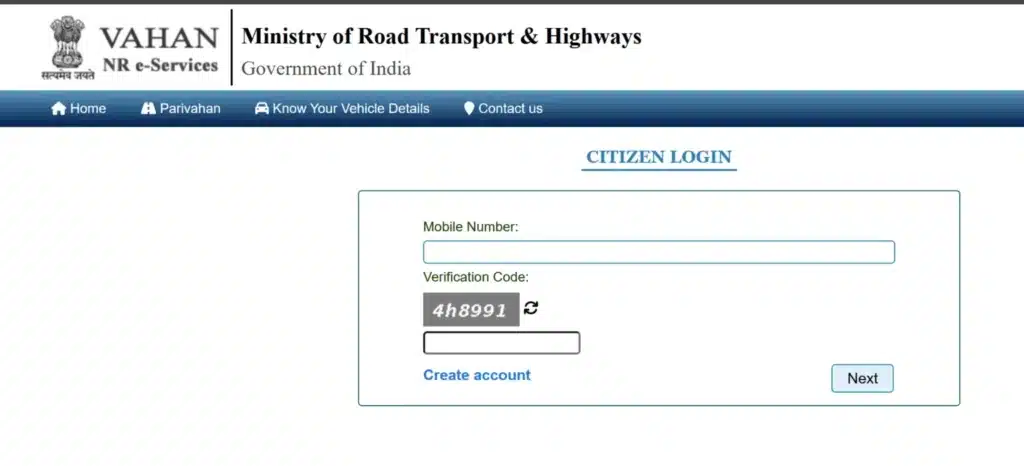
- On the Vahan NR e-services New User Registration page, enter your mobile number and email ID, and fill out the verification code. Then, click on ‘Generate OTP’.
- Next, enter your name and password and click on the “Save” Button.

- Your registration will be completed. Now, log in using your mobile number and OTP code.
- RC Status page will open, enter personal details such as Vehicle Number and Verification code.
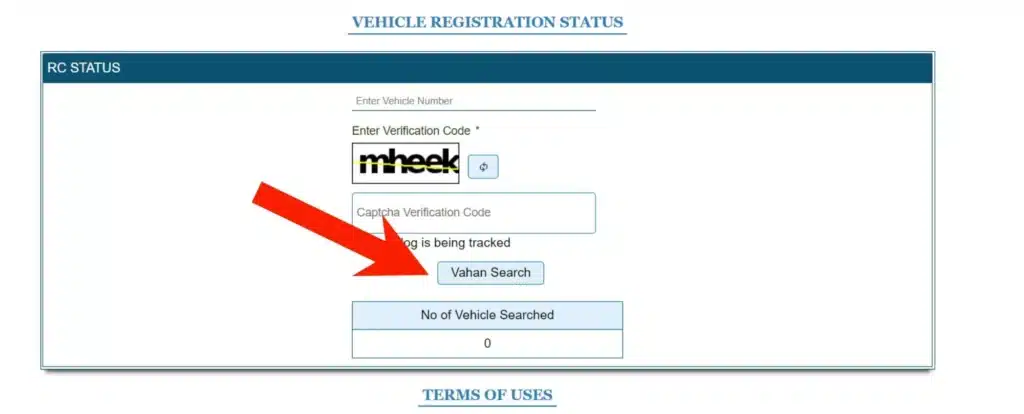
Click on “Vahan Search” to find the Owner and vehicle details like RTO name, owner’s name, registration data, insurance details, etc.
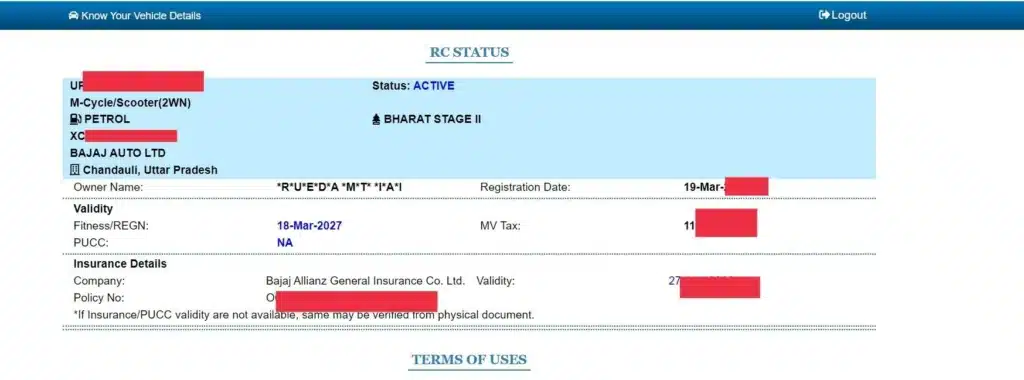
Avoid sharing personal information publicly, and take a screenshot for future reference and details of RC Status.
Obtain Vehicle Details via mParivahan App
- First, you need to download the NextGen mParivahan app from the Play Store, register, and log in.
- You will see a similar user interface to that on the website. Click on “Informational Services”.
- Then, click on the “RC Search” option below.
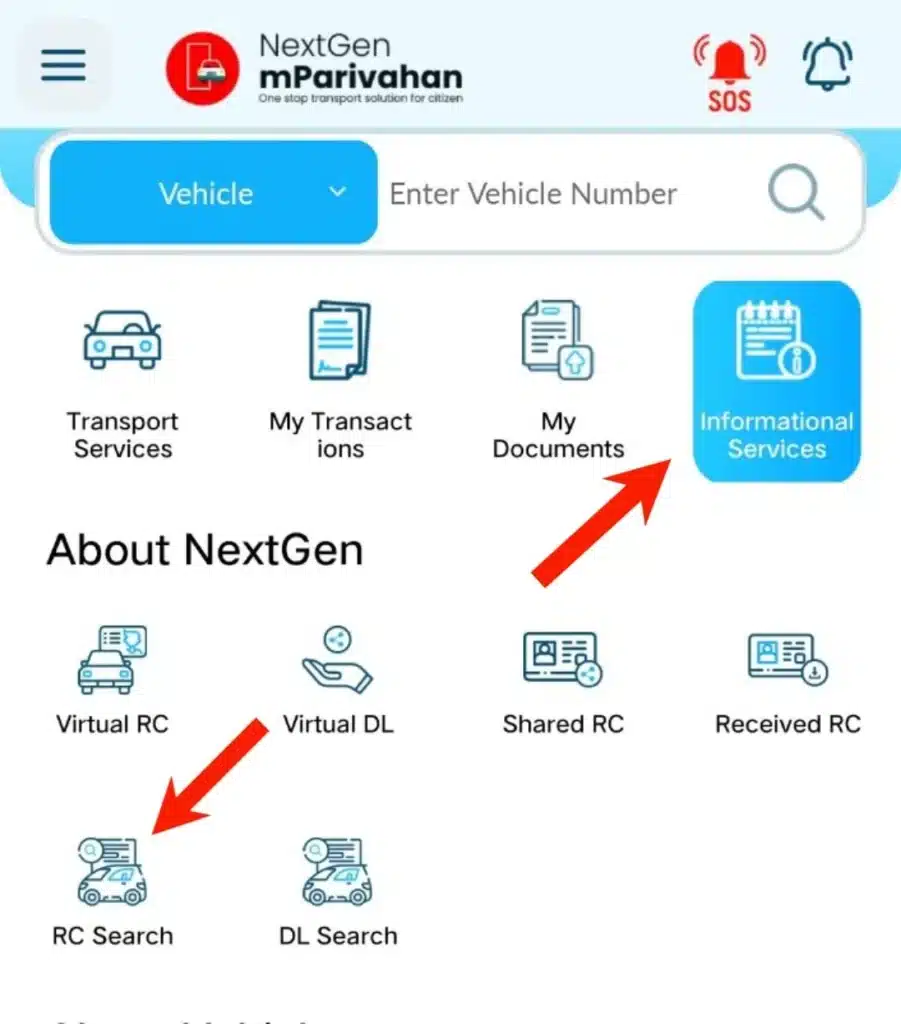
- Put the registration number of the vehicle (on the number plates) you want to check, and then click search.
- After the search, you will see the name of the vehicle owner, model, engine number, chassis number on the vehicle, and other registration details on your device screen.
- You can also explore the information about vehicle owner details by number plate.
Obtain RTO Vehicle Information
You can get information through the “Know Your Vehicle Details” on the Parivahan Portal, which allows users to get information for any vehicle under an RTO. Read the complete process:
- Visit to Transport Department website-https://parivahan.gov.in/.
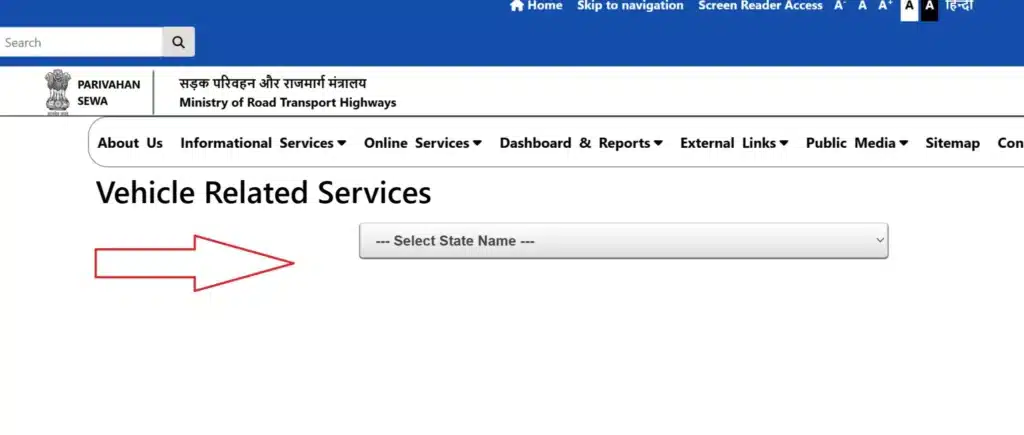
- On the homepage, find the “Vehicle Related Services” and open it.
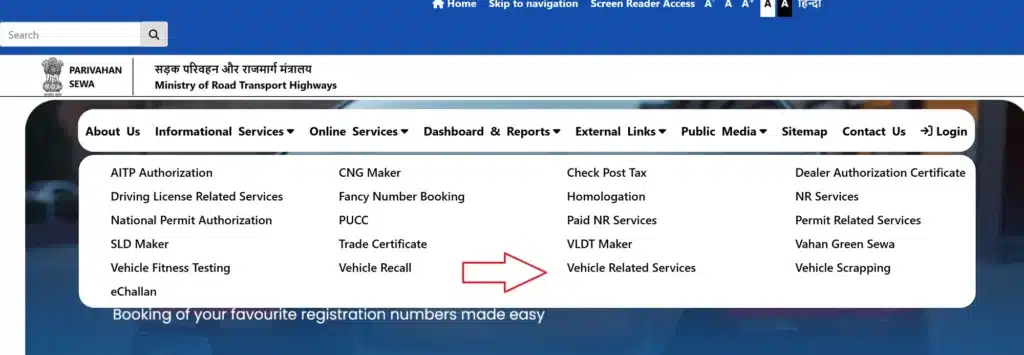
Select your state and RTO from where you want to get info, then click on “Proceed”.
Click on the “Services” in the header and select “Additional Services,” then click on “Know Your Vehicle Details.” Here you can see all the details of your vehicle.
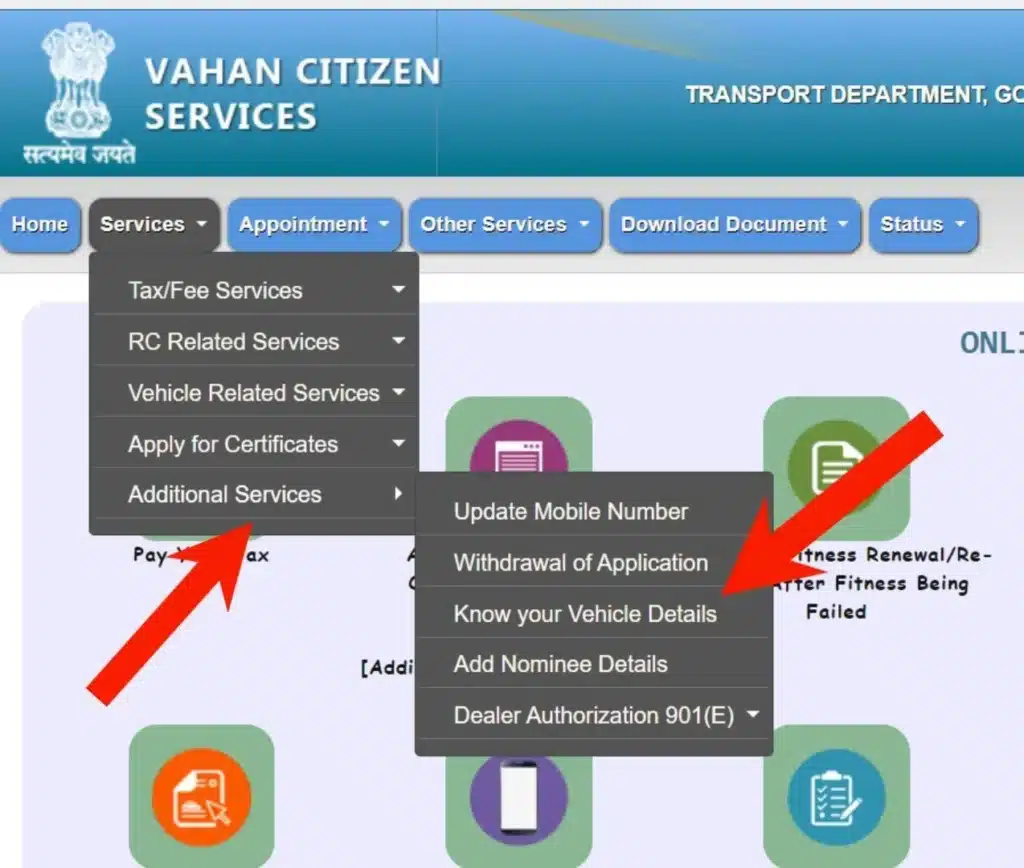
Add vehicle registration number, chassis number, and engine number. Fill the captcha with accuracy.
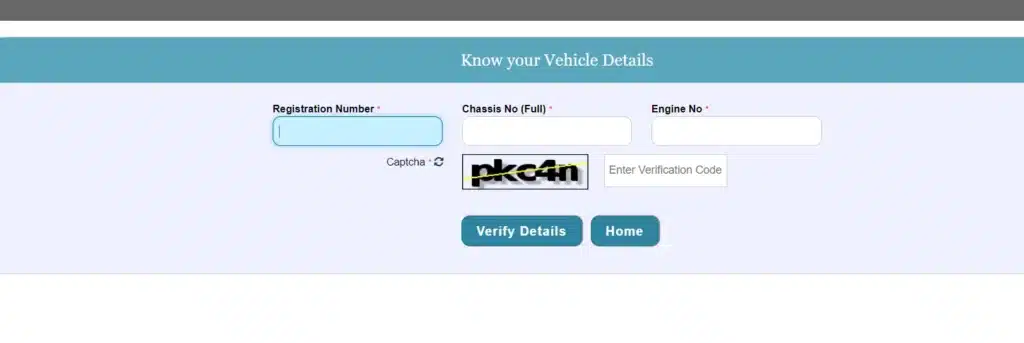
- Fill out the details with all information, and click “Verify Details”.
- Vehicle details are in front of your device screen, and you can print if needed. The following information will be shown:
| A distinct number assigned to the vehicle’s engine | Description |
|---|---|
| Vehicle Registration Date | When the vehicle was officially registered with the RTO |
| vehicle owner details by chassis number | Unique identifier etched on the vehicle’s chassis |
| Engine Number | A unique number assigned to the vehicle’s engine |
| Vehicle Class | Category of the vehicle (e.g., two-wheeler, car, truck) |
| Fuel Type | Fuel the vehicle operates on (e.g., petrol, diesel, electric) |
| Model Number | The company that produced the vehicle |
| Manufacturer Name | Company that produced the vehicle |
| Vehicle Fitness Validity Date | Date until which the vehicle’s fitness certificate is valid |
| Pollution Control Certificate Number | Emission compliance certificate with a unique number |
| Motor Vehicle Tax Validity Date | Deadline for the vehicle’s tax payment validity |
| Insurance Details | All details about the vehicle’s active insurance policy |
| Vehicle Emission Standard | Emission norm the vehicle complies with (e.g., BS-IV, BS-VI) |
| Registration Certificate Status | Current standing of the vehicle’s RC (e.g., active, expired) |
Checking vehicle owner details, registration, and driving licence information in India is now very simple and the perfect solution. Whether you use the mParivahan app, the VAHAN portal, or the SMS service, you can get complete details within minutes. With these services, you can access information quickly while maintaining a transparent and secure process.
RC Print (Form 23)
To check vehicle documents, apply these steps:
- Visit the official website – https://parivahan.gov.in/.
- On the homepage, find the “Vehicle Related Services” section in the services menu and click on it.
- Choose your State.
- Enter registration number or select RTO, then click “Proceed”.
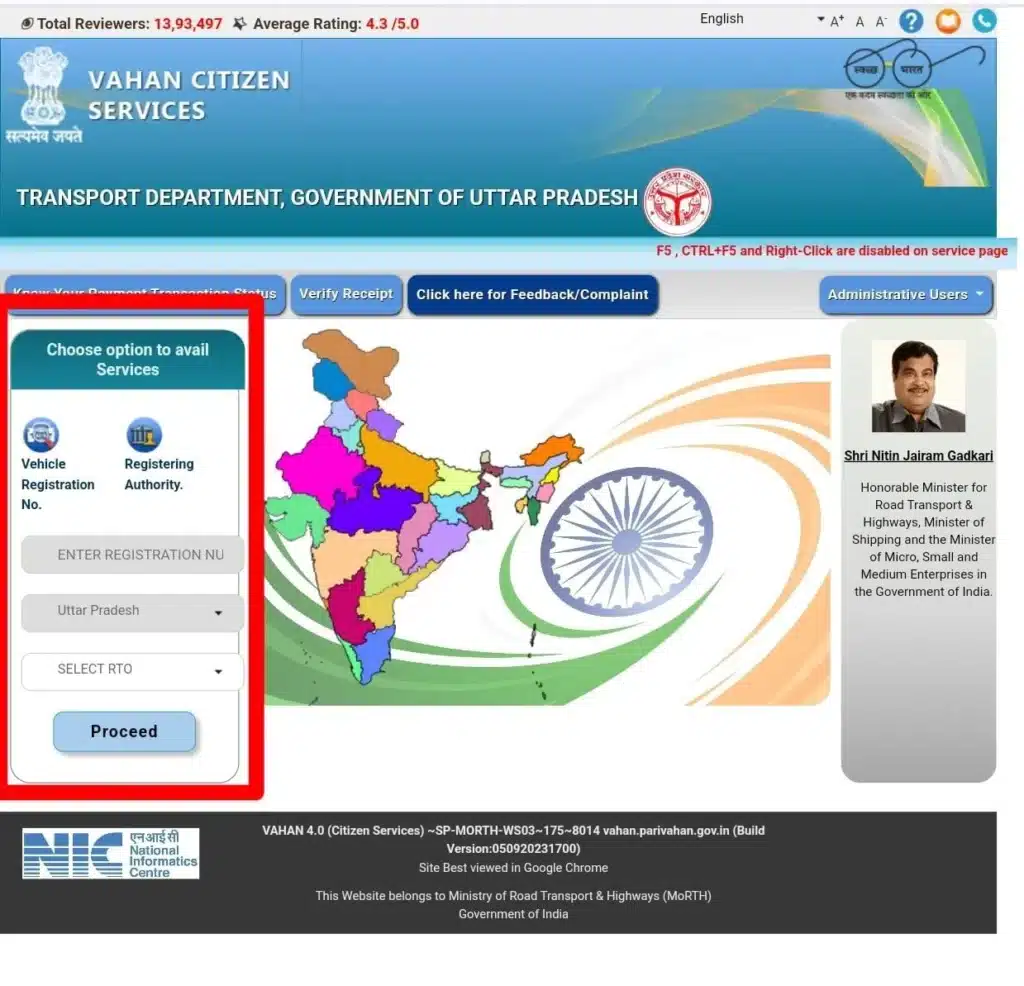
- Click on the menu bar “Download Document”.
- Select “RC Print (Form 23)” from the listed options
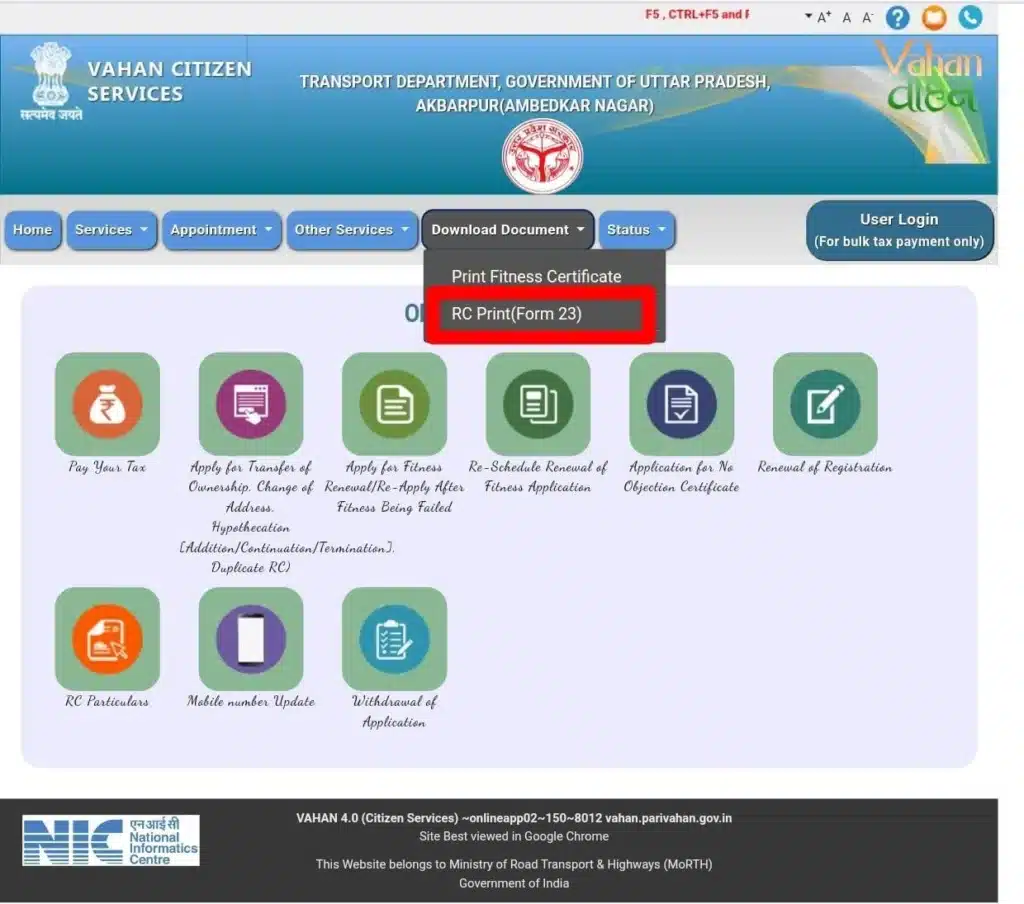
- Enter the registration number of the vehicle, chassis number, and engine number, and then click “Verify.”
- Vehicle details will be shown to you.

Vehicle Number Details
In India, a specific format follows for vehicle Registration Number check that provides all information about the vehicle, such as the state Regional Transport Office (RTO). We discuss four main parts. Here is the information below:
1. State Code
First, two letters show the state or union territory where the vehicle is registered. Each state has kept and short unique code in India.
Examples:
- MH – Maharashtra
- DL – Delhi
- UP – Uttar Pradesh
- KA – Karnataka
2. RTO Code
Second, a two-digit code indicates the Regional Transport Office (RTO) where the vehicle is registered. This helps us to know about a city or a district in a state.
Examples:
- MH 01 – Mumbai (Maharashtra)
- DL 10 – West Delhi (Delhi)
- UP 32 – Lucknow (Uttar Pradesh)
- KA 03 – Bengaluru (Karnataka)
3. Unique Vehicle Registration Number (Serial Number)
Third, a four-digit unique number indicates a vehicle’s distinct identity. This serial number is part of a sequence of vehicles registered at the RTO.
Example:
- MH 01 AB 1234 – “1234” is the unique registration number.
4. Alphabet Code
Fourth, a two-letter alphabet code is helping to make the serial number more unique in RTO.
Example:
- MH 01 AB 1234 – “AB” is the alphabet code.
Example of a Vehicle Number:
MH 01 AB 1234
- DL – Dehli (State Code)
- 01 – Mumbai RTO (RTO Code)
- AB – Alphabet Code
- 1234 – Unique Vehicle Registration Number
Information about Parivahan and Parivahan Sewa
Parivahan and Parivahan Sewa together represent a powerful digital transformation in India’s transport sector, offering citizens an easy, transparent and centralized way to access a wide range of vehicle and driving-license services online without the need to visit RTO offices.
Launched by the Ministry of Road Transport and Highways (MoRTH), the Parivahan portal integrates vehicle services (Vahan), driving-license services (Sarathi) and traffic e-challan systems into one user-friendly platform, enabling everything from new license applications and renewals to vehicle registration, ownership transfers, tax payments and challan settlements — all accessible anytime, anywhere with real-time status tracking and secure digital processes. You can use Sarathi Parivahan.
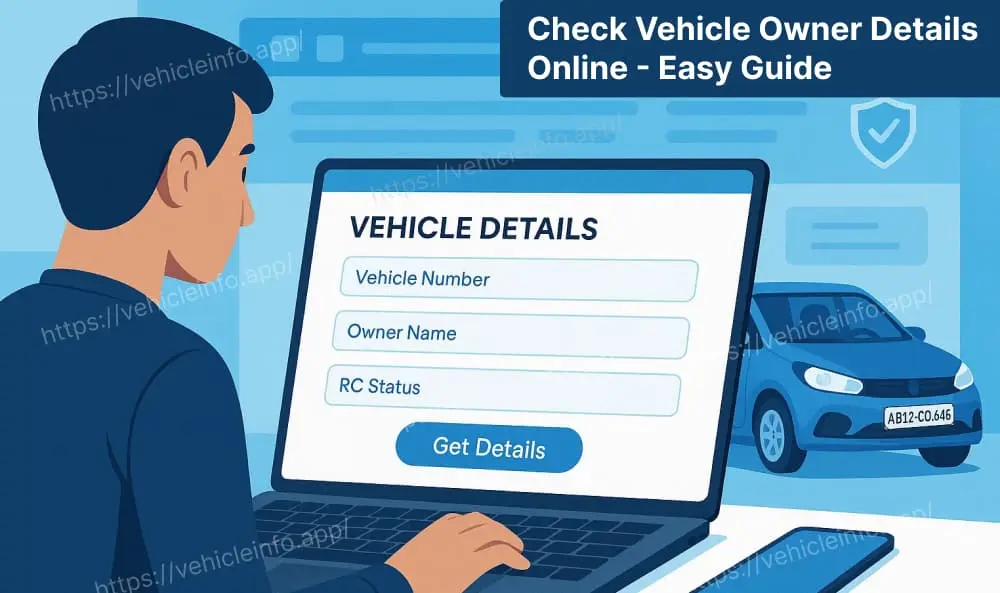
By reducing paperwork, saving time and minimizing human intervention, Parivahan Sewa not only simplifies everyday transport tasks for millions of users but also enhances transparency and accountability across the entire system.
Common State Codes for Indian States and Union Territories
All Indian states and union territories’ state codes used in vehicle registration numbers are included in this table. This list is based on standard RTO codes in India. This code is used as the first part (e.g., DL for Delhi) of the vehicle registration number.
| State/Union Territory | Code |
|---|---|
| Maharashtra | MH |
| Delhi | DL |
| Uttar Pradesh | UP |
| Karnataka | KA |
| Tamil Nadu | TN |
| Rajasthan | RJ |
| Gujarat | GJ |
| Madhya Pradesh | MP |
| Bihar | BR |
| Punjab | PB |
| West Bengal | WB |
| Assam | AS |
| Kerala | KL |
| Andhra Pradesh | AP |
| Telangana | TS |
| Odisha | OD |
| Jharkhand | JH |
| Chhattisgarh | CG |
| Haryana | HR |
| Himachal Pradesh | HP |
| Uttarakhand | UK |
| Goa | GA |
| Arunachal Pradesh | AP |
| Manipur | MN |
| Meghalaya | ML |
| Mizoram | MZ |
| Nagaland | NL |
| Sikkim | SK |
| Tripura | TR |
| Andaman and Nicobar Islands | AN |
| Chandigarh | CH |
| Dadra and Nagar Haveli, Daman and Diu | DD |
| Jammu and Kashmir | JK |
| Ladakh | LA |
| Lakshadweep | LD |
| Puducherry | PY |
FAQs
What should I do if the RC details are incorrect?
Take the Vehicle number and other documents (like ID proof, insurance papers) and go to the local RTO office. Also you can explore the Parivahan Sewa Portal.
How can I check RC details without the chassis or engine number?
Online process: Log in to the Parivahan portal or the mParivahan app and enter the vehicle registration number.
Offline process: Type “VAHAN” in your SMS and send it to 07738299899.
How do I update RC details after ownership transfer?
Visit the Parivahan portal, go to “Vehicle Related Services”, choose your state/RTO, and attach the document (Form 29, 30, NOC, etc.). Otherwise, visit your local RTO office with documents.
Is there a fee to check RC details online?
No, it’s free to check RC details on Parivahan Portal or the mParivaahan app.
How to get details of a vehicle owner?
Enter the vehicle registration number on the official VAHAN or mParivahan portal to view owner details.
How to check the vehicle owner’s details?
Use the VAHAN website or mPariivahan app and search with the vehicle number for verified information.
Get owner details from vehicle number?
Input the vehicle number on the VAHAN or mParivahan platform to access the owner and RC details.
Conclusion
Vehicle Owner Details play an important role in making transport services more transparent and secure in India. With online access to registration and ownership information, people no longer need to visit RTO offices for basic verification. Whether you are buying a used vehicle, checking your own registration status, or confirming insurance and fitness details, the online system makes the process quick and reliable.
Digital access to vehicle records has reduced fraud, improved trust between buyers and sellers, and saved valuable time for citizens. As India continues to move toward digital governance, online vehicle owner detail services will remain a helpful and essential tool for every vehicle owner in the country.
Declaration
ejobupdate.in is not affiliated with any government agency, official department, or authority. The details on this website/post are given for informational purposes. The use of our content will not be subject to the responsibility for any errors and damages. The interested candidates are always advised to check out information firsthand on the official site or notification before taking any action.