Labour Card Download – How to Get Your Labour Card Online
A Labour Card is an important registration document for eligible workers registered with a State Labour Department, Building and Other Construction Workers (BOCW) Welfare Board or another applicable worker welfare authority. After successful registration and approval, many states allow workers to access, print or download their Labour Card online through the respective official portal.
The Labour Card can serve as proof of worker registration and may help eligible workers apply for welfare schemes such as medical assistance, education support, maternity benefits, accident or disability assistance, pension-related benefits and other state-specific welfare programmes.
However, Labour Card services are not identical across India. Registration, renewal, card download, eligibility and welfare benefits are generally managed at the State/UT level. Therefore, workers should use the official Labour Department or BOCW Welfare Board service applicable to their registration.
This guide explains how to download a Labour Card online, check registration status, renew your card and solve common download problems.
Labour Card Download – Quick Overview
| Details | Information |
|---|---|
| Service | Labour Card Download |
| Common Registration | BOCW Worker Registration |
| Beneficiaries | Eligible Registered Workers |
| Authority | State Labour Department / Welfare Board |
| Application Mode | Online/Offline depending on state |
| Card Availability | Usually after registration approval |
| Download Mode | State portal where available |
| Status Check | Available in many states |
| Renewal | Depends on state/registration rules |
| Common Requirement | Registration/Application Details |
| Welfare Benefits | State and scheme specific |
| Cost | Depends on applicable state rules |
What Is a Labour Card?
The term Labour Card is commonly used for a worker registration card or certificate issued under applicable labour welfare arrangements.
A major example is BOCW worker registration.
State Building and Other Construction Workers Welfare Boards administer welfare programmes for eligible construction workers. The Ministry of Labour and Employment describes the BOCW system as providing registered construction workers access to social-security and welfare benefits administered through State Welfare Boards.
Because the system is administered largely through State/UT boards, the appearance of the card and online services can vary from one state to another.
Who Can Get a Labour Card?
Eligibility depends on the type of Labour Card and the rules applicable in your state.
For BOCW registration, the Ministry of Labour and Employment has stated that a building worker who has completed 18 years of age but has not completed 60 years, and who has worked in building or other construction work for at least 90 days during the preceding 12 months, is eligible for registration as a beneficiary under the applicable BOCW framework.
Individual state boards may require supporting documents and verification before approving registration.
Therefore, applicants should check the latest conditions displayed by their State Welfare Board.
When Can You Download Your Labour Card?
Submitting an online application does not necessarily mean the Labour Card will be immediately available.
Normally, your application needs to go through the applicable verification and approval process.
A typical process can look like:
Registration → Document Submission → Verification → Approval → Card Generation → Download/Print
For example, an official J&K BOCW worker-registration service describes a process in which the application is verified and approved before the worker can print the Labour Card from the login account.
The exact workflow varies by state.
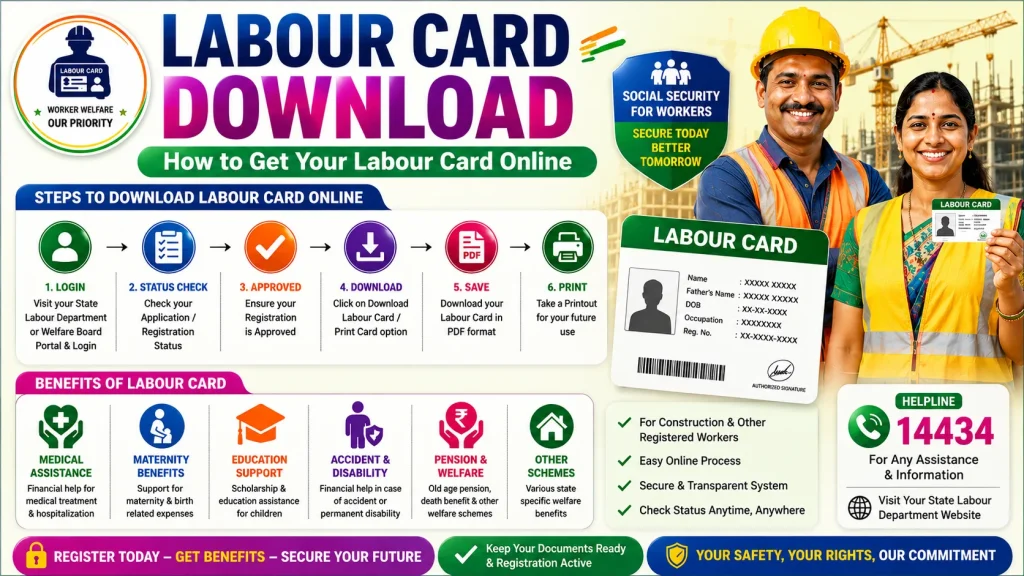
How to Download Labour Card Online
If your state provides an online download facility, follow these general steps.
Step 1: Visit Your State’s Official Labour Portal
Open the official Labour Department or BOCW Welfare Board website of the state where you are registered.
Do not randomly search for “Labour Card Download APK” or provide your Aadhaar and banking information to unknown websites.
Step 2: Find Worker or Beneficiary Services
Look for options such as:
Worker Login
Beneficiary Login
BOCW Worker Services
Registered Worker
Download Labour Card
Print Labour Card
The terminology differs between states.
Step 3: Login to Your Account
Enter the details requested by the official portal.
Depending on the system, this could include:
- Registration number
- Application number
- Registered mobile number
- Aadhaar-linked verification
- Username and password
- OTP
Use only the authentication method requested by the official service.
Step 4: Open Your Worker Profile
After logging in, locate your worker-registration information.
Make sure your name, registration number and current registration status are correct.
Step 5: Check Approval Status
Your Labour Card may not be downloadable while your application is still under verification.
Look for a status such as:
Approved / Registered / Active / Card Generated
If the application is pending, wait for the required verification or follow the instructions displayed by the portal.
Step 6: Select Download or Print
If the card is available, select the Download Card, Print Labour Card, Registration Certificate or equivalent option.
The card or certificate may open as a downloadable/printable document depending on the portal.
Step 7: Save Your Labour Card
Save the digital document securely on your mobile phone or computer.
You may also print a copy for your records.
Information Available on a Labour Card
The exact format varies by authority, but a worker card or registration certificate may contain details such as:
| Information | Description |
|---|---|
| Worker Name | Registered beneficiary name |
| Registration Number | Unique registration reference |
| Photograph | Worker identification |
| Date of Birth/Age | Registration information |
| Worker Category | Eligible occupation/category |
| Registration Date | Date of registration |
| Validity | Where applicable |
| Welfare Board | Issuing authority |
| Other Details | State-specific information |
Never modify or create a fake version of a government-issued worker card.
Documents You May Need
You generally do not need to upload all documents again simply to download an already approved card, but they may be needed during registration, correction or renewal.
Common documents can include:
- Aadhaar or accepted identity proof
- Passport-size photograph
- Age proof
- Address proof
- Employment/work certificate
- Bank passbook/details
- Registered mobile number
- Family information
- Registration/application number
- Other documents prescribed by the state
Requirements vary by Welfare Board.
How to Check Labour Card Status Before Downloading
If your card is not showing, first check the application status.
Open the official portal and locate Track Application, Application Status or a similar service.
Enter the requested information.
Possible statuses may include:
Submitted – Application has been received.
Under Verification – Documents/details are being checked.
Returned – Correction or additional information may be required.
Approved – Registration has been accepted.
Rejected – Application did not satisfy applicable requirements.
Card Generated – Digital card/certificate may be available.
If the portal gives a specific reason for a returned or rejected application, follow that instruction rather than submitting repeated applications.
Labour Card Renewal and Download
Worker registration may require renewal according to the rules of the relevant Welfare Board.
There is no single renewal period applicable to every state.
For example, the Himachal Pradesh BOCW Welfare Board currently states on its portal that a registered applicant can renew registration every three years and must upload a latest employment certificate during renewal. Other boards can follow different renewal rules.
This is why workers should not rely on a generic renewal date found on social media.
After successful renewal, check your account for an updated registration card or certificate if the portal provides one.
Why Is My Labour Card Not Downloading?
There can be several reasons.
Application Still Pending
The worker registration may not yet have been approved.
Incorrect Login Information
Check the registration number, mobile number or other credentials.
Registration Has Expired
An expired or inactive registration may need renewal.
eKYC or Verification Is Pending
Some portals require identity or Aadhaar verification for certain online services.
Documents Need Correction
Your application may have been returned because a document is missing, unreadable or inconsistent.
Portal Technical Problem
Government websites can occasionally experience maintenance or server issues. Try again later or use the official assistance channel.
What Benefits Can a Labour Card Provide?
An active Labour Card may allow eligible workers to apply for welfare programmes offered by their respective board.
Depending on the state, these can include:
Medical Assistance
Financial support for eligible medical treatment or hospitalization may be available under selected schemes.
Education Assistance
Scholarships or education-related assistance may be provided for eligible children of registered workers.
Maternity Assistance
Some Welfare Boards operate maternity-support schemes subject to eligibility conditions.
Accident and Disability Assistance
Registered workers or their eligible dependants may receive assistance in qualifying accident, disability or death cases.
Pension and Other Welfare Benefits
Some states provide pension, marriage, funeral or other social-security assistance.
Benefit amounts and eligibility rules differ substantially by state.
Labour Card vs e-Shram Card
A Labour Card/BOCW registration should not automatically be treated as the same thing as an e-Shram Card.
The e-Shram portal is a national platform of the Ministry of Labour and Employment for unorganised workers, while BOCW worker welfare is administered through State/UT Welfare Boards.
The Ministry’s current e-Shram portal provides separate registration and login services for eligible workers.
Therefore, having an e-Shram Card does not by itself mean that you have downloaded or obtained a state BOCW Labour Card.
Safety Tips While Downloading Labour Card
Use only government Labour Department, Welfare Board or authorized service portals.
Never share:
- OTP with unknown persons
- UPI PIN
- ATM PIN
- Internet banking password
- Unnecessary Aadhaar copies
- Bank login credentials
A genuine card-download process should not require you to reveal your ATM or UPI PIN.
Be especially careful with websites claiming “instant Labour Card approval” or “guaranteed government cash benefit.”
Frequently Asked Questions (FAQ)
1. Can I download my Labour Card online?
Many states provide online worker services that may include downloading or printing an approved Labour Card or registration certificate. Availability varies by state.
2. Where can I download my Labour Card?
Use the official Labour Department or BOCW Welfare Board portal of the state where you are registered.
3. Can I download the card using my mobile?
Yes, if the relevant state portal is mobile-accessible and provides a download facility.
4. Why is my Labour Card not available for download?
Your registration may still be pending, verification may be incomplete, the registration may need renewal or the portal may not offer direct download.
5. Can I download a Labour Card without registration?
No. A genuine Labour Card or worker registration certificate is issued only after the applicable registration and approval process.
6. What if I forget my registration number?
Check the account-recovery options on your state portal or contact the official Welfare Board/Labour Department assistance channel.
7. Is Labour Card renewal necessary?
Renewal rules differ by state and registration type. Check your Welfare Board’s current rules.
8. Is an e-Shram Card the same as a Labour Card?
No. e-Shram registration and state Labour/BOCW worker registration are separate systems, although integration between worker-welfare systems is being encouraged.
9. Can I get Labour Card benefits immediately after download?
Not necessarily. Individual welfare schemes can have separate eligibility, membership, contribution and application requirements.
10. Can I print my digital Labour Card?
Where the portal provides a printable card or registration certificate, you can save and print it for your records.
11. Do all states use the same Labour Card portal?
No. State/UT authorities operate their own Labour/BOCW services, so the portal and process vary.
12. Is Labour Card download free?
Charges, if any, depend on the applicable state service and registration rules. Check the official portal before making any payment.
Conclusion
Labour Card Download is generally a straightforward process once your worker registration has been successfully approved and the relevant State Labour Department or Welfare Board makes a digital card or certificate available.
Start by visiting your state’s official portal, log in with your registered details, check the application status and look for the Download/Print Labour Card option.
If your card is unavailable, check whether your application is pending, documents need correction or your registration requires renewal.
Most importantly, remember that there is no single download process for every worker across India. Always follow the current instructions of the Labour Department or BOCW Welfare Board where you are registered.
Declaration
The information provided on this website is published for informational purposes only. While every effort is made to ensure the accuracy and timely updating of the content, we do not guarantee the completeness, reliability, or authenticity of any information. Candidates and users are strongly advised to visit the official websites of the respective departments, organizations, or authorizing bodies before applying for any job, scheme, examination, or benefit program. This website is not associated with any government organisation and does not provide any recruitment guarantee or official confirmation. We are not responsible for any loss, error, or misunderstanding arising from the use of the information available on this website.