SIR 2026: Check Voter Status by SMS or 1950 Helpline – Step-by-Step Guide
Meta Description: Learn how to check if your name is included in the 2026 Voter List using SMS and the 1950 Helpline Number. Complete step-by-step guide with comparative tables and FAQs.
Focus Keywords: SIR 2026 Voter Status Check, Voter ID status by SMS, 1950 Helpline Number, Electoral Roll 2026, Voter List Search, EPIC Number Voter Search
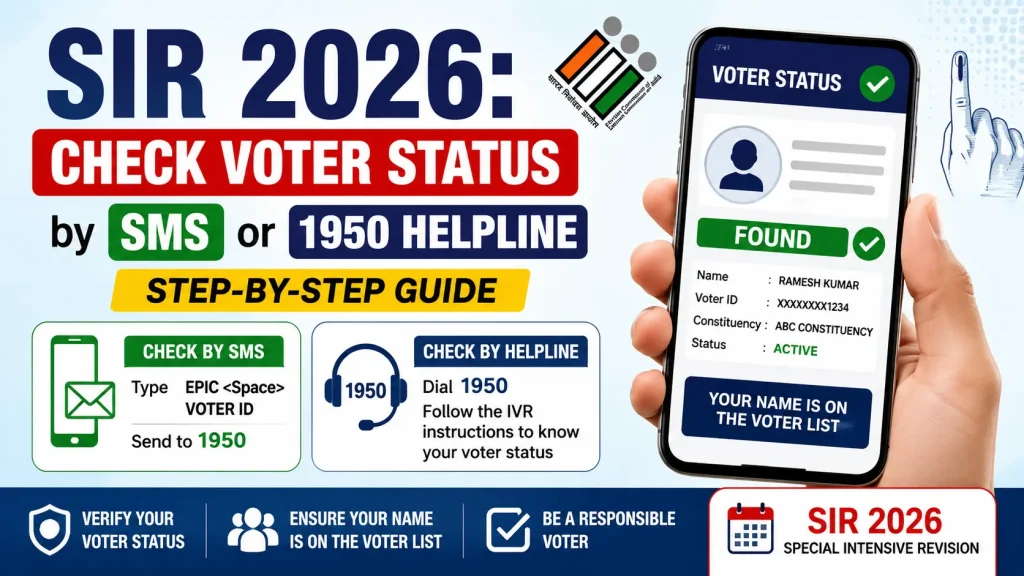
Introduction: SIR 2026 and the Importance of Checking Voter Status
The Election Commission of India (ECI) updates the Electoral Roll every year. Under the SIR 2026 (Special Summary Revision / Special Intensive Revision 2026) process, the voter lists across various states have been verified and updated.
It is a common misconception that having a valid Voter ID card (EPIC – Electors Photo Identity Card) guarantees your right to vote on election day. Under Indian electoral rules, simply holding a physical card is not enough; your name must actively appear in the current official voter list.
If you want to check your voter status from home within minutes—even without an active internet connection—the Election Commission’s SMS Service and 1950 Helpline Number are the two most effective methods. This detailed guide covers how you can quickly search for your voter details using both offline options.
Why Is Checking Your Voter Status in SIR 2026 Crucial?
Voting is a fundamental constitutional right. Failing to verify your voter details in advance can lead to unexpected issues at the polling booth:
- Prevent Name Omission: Relocation, long absences, or clerical errors can sometimes result in names being omitted from the updated electoral roll.
- Locate Your Polling Station: The 2026 reorganization may have updated your designated polling station or booth location.
- Correct Inaccurate Details: If there are errors in your name, age, relative’s name, or address, you can apply for corrections (Form 8) on time.
- Confirm New Registration: First-time voters who submitted Form 6 can verify whether their name has been successfully enrolled in the system.
Method 1: Step-by-Step Guide to Check Voter Status via SMS
Even if you do not have a smartphone or internet connection, you can receive your voter status details instantly using a standard feature phone.
Correct SMS Formats (SMS Syntax):
The Election Commission has specified exact text formats for fetching different types of information:
1. For General Voter Information:
- Format:
ECI <Space> <Your EPIC Number> - Example:
ECI WUX1234567 - Recipient Number:1950
2. To Find Your Polling Station:
- Format:
ECIPS <Space> <Your EPIC Number> - Example:
ECIPS WUX1234567 - Recipient Number:1950
3. To Get Local BLO/Official Contact Details:
- Format:
ECICONTACT <Space> <Your EPIC Number> - Example:
ECICONTACT WUX1234567 - Recipient Number:1950
Details Received via SMS Response:
Within seconds of sending the SMS, you will receive a text message containing:
- Voter’s full name and relative’s name
- Age and Gender
- Assembly Constituency Name
- Part Number and Serial Number
- Polling Station Name and Address
Method 2: Check Voter Status by Calling the 1950 Toll-Free Helpline
The Election Commission’s national toll-free helpline number 1950 operates continuously to assist citizens with voter services.
Steps to Make the Call:
- Dial with STD Code: To connect directly with your regional Chief Electoral Officer (CEO) office, prefix 1950 with your area’s STD Code (e.g., dial
0331950for Kolkata). - Select Language: Once connected, select your preferred language (English, Hindi, or regional languages).
- Navigate the IVR Menu: Listen to the voice instructions and choose the option for “Check Voter Status.”
- Provide EPIC Number: Speak or enter your Voter ID card’s EPIC Number when prompted by the system or customer service executive.
- Receive Confirmation: The executive will look up the database and read out your registration details and polling location.
Note: The 1950 service is completely toll-free. Standard call charges do not apply.
Method 3: Online Alternative on the ECI Portal
If you have an active internet connection, you can also look up your details online:
- Official Portal: Visit electoralsearch.eci.gov.in.
- Three Search Options:
- Search by Details: Input your name, relative’s name, state, district, and assembly constituency.
- Search by EPIC: Direct search using your Voter ID number.
- Search by Mobile: Search using your registered mobile number via OTP verification.
- Voter Helpline App: Download the official Voter Helpline App on Android or iOS to check your status.
Comparison: SMS vs. 1950 Helpline vs. Online Search
The comparison table below highlights which method best fits your immediate requirement:
| Feature / Detail | SMS Service (1950) | 1950 Helpline Call | Online Portal / App |
| Internet Required? | No | No | Yes |
| Smartphone Required? | No (Works on feature phones) | No (Works on feature phones) | Yes |
| Required Data | EPIC Number | EPIC Number | EPIC / Name / Mobile Number |
| Availability | 24×7 | Official Working Hours / 24×7 IVR | 24×7 |
| Cost / Fee | Standard SMS rates | Completely Toll-Free | Free (Data charges apply) |
| Best For | Instant text updates | Assistance & Query resolution | Downloading slip & full details |
What to Do If Your Name Is Missing or Information Is Incorrect
If your name does not appear in the SIR 2026 voter list or contains factual errors, you can resolve it through specific ECI application forms:
- New Voter Registration (Form 6):
- If your name is missing entirely, submit Form 6 to apply for fresh enrollment.
- Correction of Entries or Address Change (Form 8):
- To correct mistakes in name, photograph, age, or address, submit Form 8.
- Online Application: Submit applications directly via voters.eci.gov.in or through the Voter Helpline App.
- Offline Application: Submit physical copies of the forms to your local Booth Level Officer (BLO) or Sub-Divisional Officer (SDO) office.
Frequently Asked Questions (FAQs)
Q1: Does the SMS service work across all states in India?
Answer: Yes, the 1950 SMS service is functional across all states and Union Territories in India.
Q2: What should I do if I get a “No Record Found” response?
Answer: A “No Record Found” response means either the EPIC number was entered incorrectly or your name has not been updated in the SIR 2026 roll. Contact your local Booth Level Officer (BLO) immediately or file Form 6 for fresh registration.
Q3: Are there any fees for calling the 1950 Helpline?
Answer: No, the 1950 helpline is a toll-free service provided by the Election Commission of India. However, prefixing your local STD code ensures direct routing to your state’s CEO desk.
Q4: Can I check my status via SMS if I lost my Voter ID card?
Answer: SMS queries require your EPIC number. If you lost your card, search for your EPIC number first using your name and location details on the online ECI portal, then use the number to query via SMS or phone.
Q5: How long does it take for a new application to reflect in the voter list?
Answer: After submitting Form 6 or Form 8, the BLO conducts a field verification. The entire approval and inclusion process typically takes between 15 to 30 working days.
Declaration
The information provided on this website is published for informational purposes only. While every effort is made to ensure the accuracy and timely updating of the content, we do not guarantee the completeness, reliability, or authenticity of any information. Candidates and users are strongly advised to visit the official websites of the respective departments, organizations, or authorizing bodies before applying for any job, scheme, examination, or benefit program. This website is not associated with any government organisation and does not provide any recruitment guarantee or official confirmation. We are not responsible for any loss, error, or misunderstanding arising from the use of the information available on this website.