Daily Medication Reminder – Organize Medicine Times & Set Dose Alerts on Your Phone
Managing medicines can become difficult when you have a busy routine, take several medicines, or need to remember different scheduled doses throughout the day. A Daily Medication Reminder can provide a simple way to organize medicine times and create dose alerts directly on your smartphone.
Instead of depending only on memory, you can use a Medicine Reminder App, regular phone alarm, calendar notification, or medication chart to remind yourself about the schedule you have already been given.
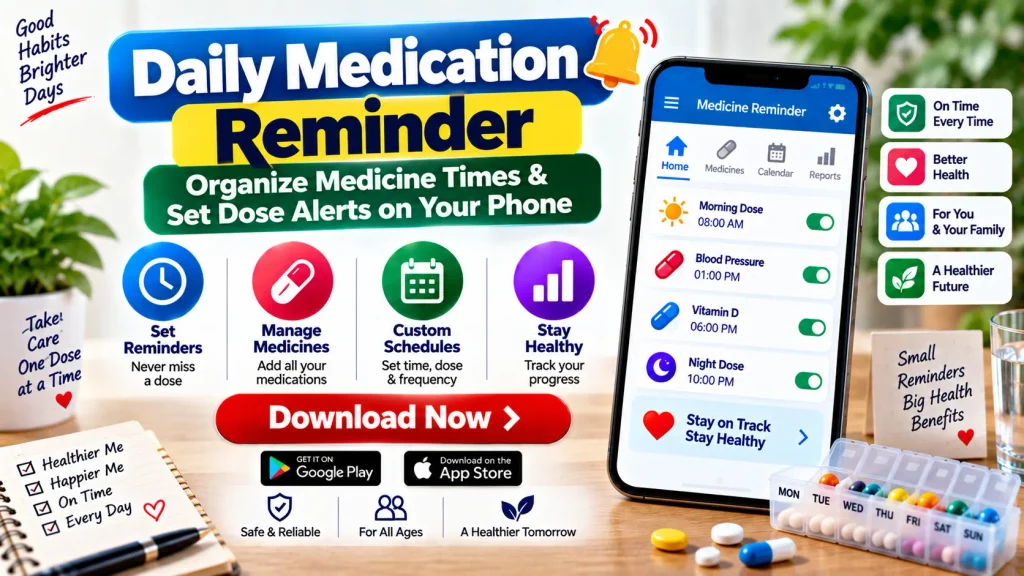
For example, if your current instructions say to take a medicine in the morning and another at night, separate reminders can help you remember those scheduled times.
A reminder is an organizational tool, not a medical decision-making tool. Your doctor, pharmacist, prescription label, or other qualified healthcare professional should determine which medicine you take, the appropriate dose, and when it should be taken.
What Is a Daily Medication Reminder?
A Daily Medication Reminder is a digital or physical system that helps you remember scheduled medicine times.
On a smartphone, you can create an alert for each medicine and select the appropriate time. When that time arrives, your phone provides a notification.
Depending on the app or tool you choose, you may also be able to organize several medicines, set repeating reminders, record scheduled doses, create refill alerts, and maintain a medicine list.
A simple phone alarm may be enough for someone with a basic routine. People managing several medicines may prefer a dedicated medication reminder app with more organizational features.
Daily Medication Reminder – Quick Overview
| Feature | Details |
|---|---|
| Main Purpose | Help remember scheduled medicine times |
| Reminder Device | Smartphone, tablet or compatible device |
| Reminder Type | Alarm, notification or dose alert |
| Schedule | Daily, selected days or custom times |
| Multiple Medicines | Separate reminders may be created |
| Common Times | Morning, afternoon, evening and bedtime |
| Dose Tracking | Available in some reminder apps |
| Refill Alerts | May be available depending on the app |
| Medication List | Can help organize current medicines |
| Important | Follow professional medication instructions |
Why Use Daily Medicine Reminders?
It can be easy to forget a scheduled medicine when you are working, travelling, sleeping at different times, or simply handling many daily responsibilities.
A reminder provides an additional prompt at the time you have already scheduled.
Phone alarms are one of the strategies MedlinePlus recommends for remembering medicine times. A medication chart can also be used to list medicines and their scheduled times.
These tools can be particularly helpful for organizing a routine involving several medicines.
The important point is that your reminder should reflect your actual medication instructions. You should not create a different schedule simply because another time is more convenient.
How to Organize Your Medicine Times
Before setting any alerts, create a clear list of your current medicines.
Write down the medicine name, prescribed or instructed dose, scheduled time, frequency, and any relevant directions you have been given.
You may organize the list into sections such as:
- Morning medicines
- Afternoon medicines
- Evening medicines
- Bedtime medicines
- Medicines scheduled only on specific days
Keeping everything in one organized list can make it easier to create accurate reminders.
The FDA recommends maintaining a current list that includes prescription medicines, over-the-counter medicines, vitamins, and supplements.
How to Set Dose Alerts on Your Phone
Creating medication reminders on a smartphone is generally straightforward. The exact process varies depending on your phone or selected application.
Step 1: Check Your Current Instructions
Before creating a reminder, review the prescription label or instructions provided by your healthcare professional.
Confirm the medicine name, dose, frequency, and scheduled time.
If anything is unclear, ask your doctor or pharmacist rather than guessing.
Step 2: Choose a Reminder Method
You can use a standard phone alarm, calendar, task/reminder feature, or dedicated Medicine Reminder App.
A normal alarm is useful for basic schedules, while dedicated apps may offer additional organizational features.
Step 3: Add the Medicine Name
Give every reminder a clear label.
Instead of writing only “Medicine,” use a label that allows you to identify which scheduled medicine the alert refers to.
This becomes particularly important if you have several alerts during the day.
Step 4: Set the Correct Time
Set the alert according to your existing medication instructions.
If your instructions include specific requirements related to meals or other timing considerations, follow those directions.
Do not independently change the timing of a prescribed medicine.
Step 5: Select Repeat Days
For a medicine scheduled every day, you may be able to set the reminder to repeat daily.
For medicines taken only on selected days, choose the appropriate days if your reminder tool supports this feature.
Step 6: Enable Notifications
Make sure your phone allows notifications from the reminder app.
Check notification permissions, sound settings, Do Not Disturb settings, and battery restrictions if alerts are not appearing properly.
Step 7: Test the Alert
Create a test notification to confirm that you can hear or see it.
A reminder is useful only if it reliably reaches you at the scheduled time.
Organizing Multiple Medicines
If you take several medicines, using one generic reminder for all of them can become confusing.
Instead, consider creating separate clearly labeled reminders based on the schedule you have been given.
A medicine record can include the medicine name, dose, time, and a place to mark whether the scheduled medicine was taken.
Some people may also use pill organizers. However, medicine storage requirements vary, so ask a pharmacist if you are unsure whether a particular medicine can be placed in an organizer.
Keeping an accurate medication list is also useful when visiting doctors, pharmacists, or other healthcare professionals.
Medicine Reminder App vs Phone Alarm
A regular phone alarm can be an effective solution for basic medication reminders.
You can set an alarm, give it a clear label, choose the appropriate time, and repeat it on selected days.
A dedicated Medication Reminder App may provide additional features, depending on the app, such as:
- Multiple medication profiles
- Daily dose alerts
- Custom schedules
- Dose history
- Refill reminders
- Medication lists
- Caregiver-related features
- Reminder history
You do not necessarily need the most complicated option. A reminder system that is clear, reliable, and easy for you to maintain may be more useful than one with features you never use.
Create a Daily Medication Schedule
A medication schedule can provide a quick overview of your routine.
You can create a simple chart with columns for the medicine name, dose, time, frequency, and relevant instructions.
For example, you might group scheduled medicines under morning, afternoon, evening, and bedtime.
Your schedule should be based on current instructions rather than general advice from an app or website.
Whenever a prescription changes, update both your medication list and your digital reminders.
Removing outdated alerts is particularly important because an old notification could create confusion.
Can You Track Scheduled Doses?
Some Medicine Reminder Apps allow users to mark a reminder as completed or record that a scheduled dose was taken.
This can help you keep track of reminder activity, especially when several medicines are scheduled during the day.
Some apps may also allow entries such as skipped or delayed.
However, app records should not automatically be considered complete medical records, and marking an alert as completed does not verify that the medicine was taken correctly.
Use tracking features primarily as organizational aids.
Refill Reminder Features
Some apps include refill alerts in addition to daily medication reminders.
A refill reminder may notify you before your current supply is expected to run out.
This can be convenient for medicines that are used on an ongoing basis.
However, a refill alert does not mean that a prescription is automatically eligible for refill. Prescription requirements depend on the medicine and applicable instructions.
Contact your pharmacy or healthcare professional when necessary.
Daily Medication Reminders for Caregivers
Caregivers who help a family member manage medicines may also find reminder systems useful.
MedlinePlus recommends maintaining an up-to-date list of medicines and supplements and notes that mobile notifications can be used to help track medicine times.
A caregiver can create clearly labeled reminders based on the person’s current medication instructions.
Whenever the healthcare provider changes the medication plan, the caregiver should update the schedule and remove outdated reminders.
Caregivers should not independently change a prescribed dose or discontinue a medicine.
What Should You Do If You Miss a Dose?
A medication reminder can reduce reliance on memory, but a reminder can still be missed.
There is no single missed-dose rule that applies to every medicine.
Do not automatically take twice the amount at the next scheduled time to compensate for a missed dose.
Check the instructions for the particular medicine. If you are uncertain, contact your doctor or pharmacist for guidance.
MedlinePlus advises contacting a healthcare provider if you are unsure what to do after missing a dose.
Important Medicine Safety Tips
A reminder app should always be used alongside safe medication practices.
Follow the instructions on your prescription or medicine label and ask questions when you do not understand them.
Keep an updated medication list and share it with your healthcare professionals when appropriate.
Do not share prescription medicines with another person.
Do not change the dose, frequency, or timing of a prescribed medicine solely because of information from an app or general website.
Store medicines safely and follow any specific storage instructions. Keep medicines out of the reach of children.
If you experience an unexpected reaction or have concerns about side effects or medicine interactions, contact an appropriate healthcare professional.
Benefits of an Organized Medication Reminder System
A well-organized reminder system can make a complicated medicine routine easier to understand.
Instead of trying to remember every scheduled time, you can use your phone to provide alerts throughout the day.
It can also make it easier to maintain a consistent list of medicines and identify outdated reminders when your treatment plan changes.
For caregivers, separate reminders can provide a structured way to follow an existing medication plan.
The goal is not to replace professional healthcare advice but to make the instructions you already have easier to organize and remember.
Frequently Asked Questions (FAQ)
1. What is a Daily Medication Reminder?
A Daily Medication Reminder is a tool that helps users remember scheduled medicine times using alarms, notifications, charts, or reminder applications.
2. Can I set medicine reminders on my phone?
Yes. You can use a standard phone alarm, calendar, reminder feature, or dedicated Medicine Reminder App.
3. Can I create multiple dose alerts?
Many smartphones and medication reminder apps allow multiple alerts. Each reminder can be labeled for a particular scheduled medicine.
4. Can I set reminders for different days?
Many reminder systems allow alerts to repeat daily or on selected days. The schedule should match your actual medication instructions.
5. What information should I keep in my medicine list?
Useful information includes the medicine name, strength or dose, scheduled time, frequency, and instructions. Include prescription medicines, OTC medicines, vitamins, and supplements when maintaining a complete medication list.
6. Can a Medicine Reminder App track doses?
Some apps provide dose-tracking features that allow users to record reminder activity. Features vary by application.
7. Can caregivers use medication reminders?
Yes. Caregivers can use alarms, medication charts, and reminder apps to organize an existing medication schedule for a family member.
8. What should I do if I miss a medicine?
Follow the instructions for that specific medicine. If you are unsure, contact your doctor or pharmacist. Do not automatically double the next dose.
9. Should I update my reminder if my prescription changes?
Yes. Update or delete old reminders whenever your medication instructions change.
10. Does a medication reminder replace medical advice?
No. A medication reminder is an organizational tool. It does not replace a doctor, pharmacist, prescription instructions, diagnosis, or individualized medical advice.
Final Words
A Daily Medication Reminder can be a practical way to organize medicine times and set dose alerts on your phone. Whether you use a simple alarm or a dedicated Medicine Reminder App, clearly labeled notifications can help you remember the medication schedule you have already been given.
Create an accurate medicine list, organize scheduled times, set appropriate alerts, and update your reminders whenever your treatment plan changes.
Most importantly, remember that reminder tools help with organization—they do not determine your treatment. Always follow your current medication directions and ask a doctor or pharmacist when you have questions about a dose, timing, missed medicine, side effect, or interaction.
Disclaimer: This article is provided for general informational and educational purposes only. It does not provide medical advice, diagnosis, or treatment. Medication reminder tools should not be used to independently determine or change a medicine, dose, frequency, or schedule. Always follow instructions from your doctor, pharmacist, prescription label, or other qualified healthcare professional.