Caller Name Announcer for Mobile – Hear Caller Names Before You Answer
A Caller Name Announcer for Mobile can help you identify incoming callers without immediately looking at your phone screen. Using Text-to-Speech (TTS) technology, compatible apps can automatically speak the name of a saved contact when your phone rings. This can be particularly convenient when you’re cooking, exercising, working, cleaning, or doing something else that keeps your hands occupied.
For example, if a contact saved as “Rahul” calls you, the phone may announce “Rahul is calling.” You can then decide whether you want to answer the call without first checking the display.
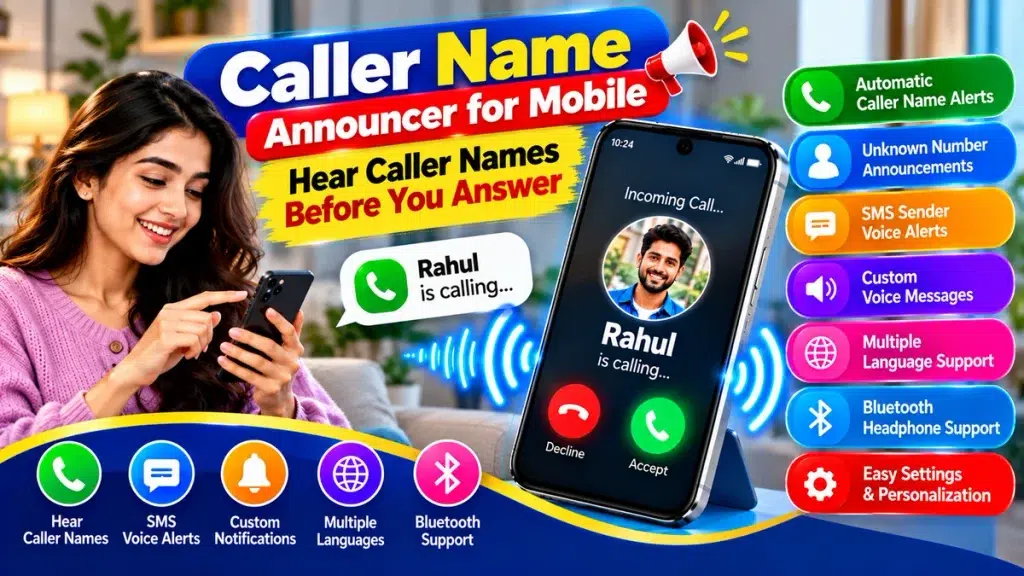
Depending on the app and smartphone, additional features may include unknown-number announcements, SMS sender alerts, custom voice messages, multiple languages, repeat controls, and Bluetooth support.
Caller Name Announcer – Quick Overview
| Feature | Details |
|---|---|
| App Type | Caller Name Announcer |
| Main Purpose | Hear caller names before answering |
| Technology | Text-to-Speech (TTS) |
| Saved Contacts | Can announce contact names |
| Unknown Numbers | May announce the number |
| SMS Alerts | Available in selected apps |
| Custom Announcements | Available in some apps |
| Multiple Languages | Depends on TTS support |
| Bluetooth | Depends on app and device |
| Offline Use | Some basic functions may work offline |
| Best For | Hands-free caller identification |
What Is a Caller Name Announcer for Mobile?
A Caller Name Announcer is a mobile utility that provides spoken information when an incoming call arrives.
Normally, your smartphone displays a caller’s name or phone number on the screen. This requires you to look at the phone to identify the caller.
With caller announcements enabled, compatible software can use the caller information available on your device and convert it into speech.
For example:
“Incoming call from Priya.”
You can hear who is calling before deciding whether to answer.
Some smartphones already provide a built-in caller-announcement feature. Therefore, it is worth checking your Phone app or device settings before installing a separate application.
How Does Caller Name Announcement Work?
Caller Name Announcer apps generally use your smartphone’s Text-to-Speech engine.
When someone calls, the app checks the caller information available through the operating system. If the number matches a saved contact, the associated name can be sent to the TTS engine.
The TTS engine then converts the contact name into spoken audio.
The process can be summarized as:
Incoming Call → Contact Identification → TTS Processing → Caller Name Announcement
If the number isn’t saved, some apps may read the phone number aloud or simply announce that an unknown caller is calling.
The exact behavior varies by application, smartphone, operating system, and permissions.
Why Use a Caller Name Announcer?
The biggest advantage is convenience. You don’t have to immediately pick up your phone simply to see who is calling.
Hear Caller Names Hands-Free
If your phone is on a desk or your hands are occupied, you can hear the caller’s name from the voice announcement.
You can then decide whether the call requires immediate attention.
Useful While Cooking
Touching your smartphone while preparing food isn’t always convenient.
If a call arrives, a voice announcement can tell you who is calling without requiring you to touch the screen.
Convenient During Exercise
Whether you’re exercising at home or working out, repeatedly checking your phone can interrupt your routine.
Caller announcements allow you to identify incoming calls through audio.
Helpful While Working
If you receive frequent calls during work, checking every incoming call can interrupt concentration.
Hearing the caller’s name first can help you decide which calls may require an immediate response.
Useful for Audio-Based Accessibility
Spoken caller information can complement other accessibility features for people who prefer audio feedback or find visual information difficult to read.
Main Features of Caller Name Announcer Apps
Features differ between apps, but several options are particularly useful.
1. Automatic Caller Name Announcement
This is the core function.
When a saved contact calls, the app can automatically speak the person’s name.
For example:
“Amit is calling.”
No manual action is required to identify the caller once the feature has been configured.
2. Unknown Number Announcement
What happens when an unsaved number calls?
Some applications can read the number aloud. Others may provide a general announcement such as:
“Unknown caller.”
3. Custom Voice Alerts
Some apps allow you to customize the announcement phrase.
You might choose:
“You have an incoming call from Rahul.”
or simply:
“Rahul is calling.”
This allows you to personalize how incoming calls are announced.
4. Repeat Caller Name
Selected apps allow you to determine how many times the caller’s name should be repeated.
For example, you may prefer one announcement rather than having the caller’s name repeated throughout the ringing period.
5. Voice Speed and Pitch
Text-to-Speech engines may provide options for adjusting speech rate and pitch.
If the announcement sounds too fast, reducing the speech speed may make names easier to understand.
6. Multiple Language Support
Depending on the TTS engine installed on your smartphone, different languages and voices may be available.
Choosing a language that matches your saved contact names can improve pronunciation.
7. SMS Sender Announcements
Some Caller Name Announcer apps also provide SMS sender alerts.
For example:
“New message from Priya.”
Certain applications may also offer full SMS reading, but users should consider privacy before enabling message-content announcements.
8. Bluetooth Support
Caller announcements may work through connected Bluetooth headphones or other audio devices in some configurations.
This can provide additional privacy because the caller’s name may be heard through your headphones rather than the phone speaker.
Caller Name Announcer Features at a Glance
| Feature | Purpose |
|---|---|
| Caller Name Alert | Speaks saved contact names |
| Unknown Caller Alert | May announce unsaved numbers |
| Automatic Announcement | Works when incoming calls arrive |
| Custom Voice Message | Changes the spoken phrase |
| Repeat Control | Sets announcement frequency |
| Speech Speed | Controls how quickly names are spoken |
| Language Selection | Changes compatible TTS language |
| SMS Sender Alert | Announces message sender |
| Bluetooth Support | May route alerts to connected devices |
| Offline TTS | May allow basic offline announcements |
How to Set Up Caller Name Announcer on Mobile
Setting up the feature is generally straightforward, although the exact steps depend on your phone.
Step 1: Check Built-In Caller Announcement
First, check whether your smartphone already has a caller-announcement feature.
Look in your Phone app, call settings, accessibility settings, or related system options.
If a suitable built-in feature is available, you may not need an additional app.
Step 2: Choose a Suitable App
If your phone doesn’t provide the feature you need, search your device’s official app store for a Caller Name Announcer.
Before installing, review the developer information, privacy details, ratings, recent updates, and requested permissions.
Step 3: Enable Caller Announcements
Open the app and activate the incoming caller-name announcement option.
Step 4: Review Permissions
The app may need relevant access to match an incoming number with your saved contacts.
Grant only the permissions required for the features you intend to use.
Step 5: Configure Text-to-Speech
Choose a suitable language and TTS voice.
Adjust speech speed and pitch where available.
Step 6: Customize Your Alert
Choose the announcement phrase and repeat frequency if the app provides these options.
You can also configure SMS or Bluetooth functions if you need them.
Step 7: Test an Incoming Call
Ask someone to call your phone or use another phone for testing.
Confirm that the caller’s name is announced correctly before you answer.
Can Caller Name Announcer Work Without Internet?
Some basic Caller Name Announcer functions may work without an active internet connection.
If the caller’s information is stored locally in your contacts and an offline Text-to-Speech voice is installed on the device, spoken caller-name alerts may be generated locally.
However, offline functionality isn’t universal.
Cloud-based TTS voices, online caller-identification services, advertisements, app updates, or additional services may require internet access.
If offline caller announcements are important to you, check the specific app and TTS voice requirements.
Does Caller Name Announcer Work with Bluetooth?
It can in some configurations.
When Bluetooth headphones or another compatible audio device are connected, spoken caller information may be routed through the connected device.
This can be particularly useful in public because it may prevent the caller’s name from being announced through the phone’s loudspeaker.
Bluetooth behavior can vary depending on the smartphone, operating system, application, and connected accessory, so test your own setup.
Privacy and Security Tips
Caller-announcement applications can interact with personal information, making privacy an important consideration.
Check every permission requested by the app and consider whether it is necessary for the function you’re enabling.
Remember that a caller’s name spoken through the loudspeaker may be heard by anyone nearby.
If an app provides SMS message reading, be particularly careful. Messages can contain personal conversations, financial notifications, verification information, and other sensitive content.
Where available, consider enabling only the SMS sender’s name rather than full message content.
Use apps from trusted developers and official app stores, and review privacy information before granting sensitive access.
Caller Announcements While Driving
Hearing a caller’s name may reduce the need to look at the phone screen solely to identify an incoming caller.
However, this does not remove the risks associated with distracted driving.
Avoid manually operating your smartphone while driving when doing so is unsafe or prohibited. Follow applicable traffic rules and use an appropriate hands-free system where permitted.
Advantages and Limitations
| Advantages | Limitations |
|---|---|
| Hear caller names automatically | Features vary between apps |
| Less need to check the screen | Permissions may be required |
| Useful when hands are occupied | Announcements may affect privacy |
| Multiple languages may be supported | TTS pronunciation can vary |
| Custom alerts may be available | Not every app supports customization |
| Bluetooth may provide private alerts | Audio routing varies by device |
| Some features may work offline | Other functions require internet |
| SMS alerts may be supported | Message reading can expose information |
Tips for Better Caller Name Announcements
Keep contact names clear and avoid unnecessary symbols or complicated abbreviations. Text-to-Speech systems can sometimes have difficulty pronouncing unusual contact names.
Select a TTS voice that matches the language used in your contacts.
If names are spoken too quickly, reduce the TTS speech rate.
Keep the repeat count low enough that announcements don’t become distracting.
Use silent or Do Not Disturb settings when spoken alerts would be inappropriate.
If you’re in a public place, consider compatible headphones for greater privacy.
Frequently Asked Questions (FAQ)
1. What is a Caller Name Announcer for Mobile?
It is a smartphone feature or app that can speak available caller information when an incoming call arrives.
2. Can it announce saved contact names?
Yes. Compatible apps can announce a saved contact’s name when the necessary information and permissions are available.
3. Can I hear the caller’s name before answering?
Yes. The purpose of the feature is to provide the caller information while the phone is ringing, allowing you to know who is calling before you answer.
4. What happens when an unknown number calls?
Some apps may read the number aloud, while others provide a generic unknown-caller announcement.
5. Does Caller Name Announcer require internet?
Some basic functions may work offline when the required contact information and TTS voice are stored locally. Other functions may require internet access.
6. Can I change the announcement voice?
Available voices depend on your smartphone’s Text-to-Speech engine and installed voice packages.
7. Can it announce SMS senders?
Some Caller Name Announcer apps include optional SMS sender alerts.
8. Does it work with Bluetooth headphones?
It may. Bluetooth functionality depends on your phone, operating system, application, and connected audio device.
9. Why are some contact names pronounced incorrectly?
TTS engines may have difficulty with unusual spellings, abbreviations, regional names, or names written in a language different from the selected voice.
10. Do I need to install a separate app?
Not always. Some smartphones already include caller-announcement features, so check your phone settings before installing another app.
Conclusion
A Caller Name Announcer for Mobile provides a convenient way to hear caller names before you answer. Instead of checking your smartphone display whenever a call arrives, compatible caller-announcement features can use Text-to-Speech technology to speak the name of a saved contact automatically.
Depending on your device and application, you may also get unknown-number announcements, custom voice alerts, SMS sender announcements, multiple language options, repeat controls, and Bluetooth support.
The feature can be especially useful while cooking, exercising, working, cleaning, or performing other activities where checking your phone immediately isn’t convenient.
For the best experience, use a trusted app or your phone’s built-in caller-announcement feature, review permissions carefully, configure the appropriate TTS voice, and consider privacy when announcements are played aloud.
With the right settings, Caller Name Announcer can provide a simple hands-free way to know who is calling before you decide whether to answer.