X-Ray Camera for Mobile – Explore Scanner Effects, Features & How It Works
Mobile photography has become much more creative with the growth of camera filters, augmented reality, AI-powered editing tools, and entertainment apps. Today, smartphone users can transform ordinary photographs into artistic images, apply special effects, add virtual objects, and create realistic-looking simulations. One interesting category that continues to attract attention is the X-Ray Camera for Mobile.
X-ray camera apps can create pictures that resemble X-ray scans. Depending on the application, users may find skeleton effects, glowing bone graphics, scanning animations, negative filters, and other X-ray-inspired visual features.
However, an important distinction must be made. A standard smartphone cannot perform a genuine medical X-ray scan simply by installing an application. Mobile X-ray camera apps generally create simulated visual effects through software.
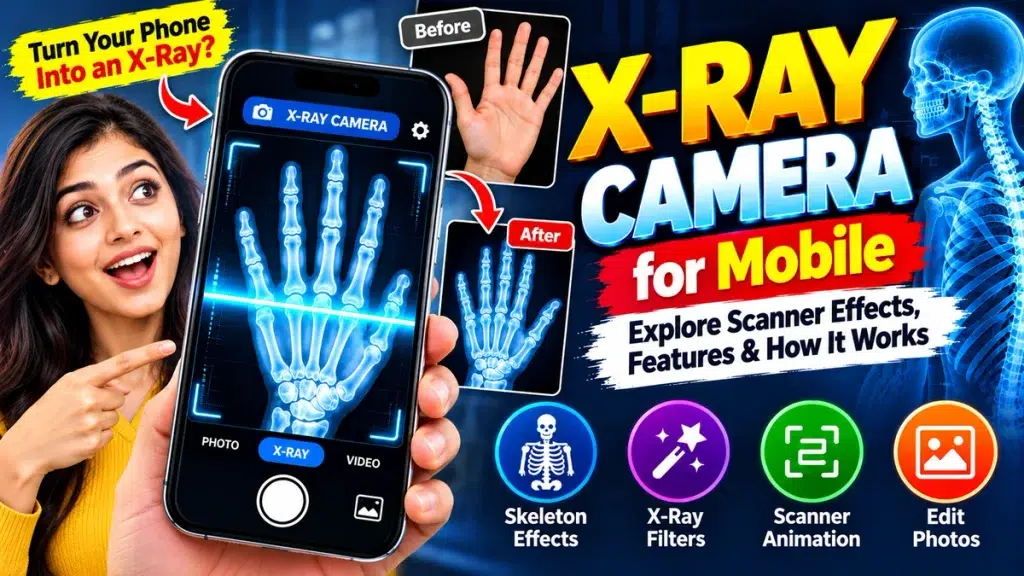
This guide explains how mobile X-ray camera effects work, the features you may find, how to use them, and what limitations you should understand before downloading an app.
X-Ray Camera for Mobile – Quick Overview
| Feature | Details |
|---|---|
| App Category | Photography / Entertainment / Simulation |
| Main Purpose | X-ray-style photo effects |
| Real X-Ray Scan | No |
| Popular Effects | Skeleton, negative, scanner and X-ray filters |
| Live Camera Support | Depends on the app |
| Gallery Photo Editing | Available in many apps |
| Scanner Animation | May be included |
| Medical Diagnosis | Not supported |
| Best For | Entertainment and creative editing |
| Important Note | Effects are simulated digitally |
What Is an X-Ray Camera for Mobile?
An X-Ray Camera for Mobile usually refers to an application that creates visual effects inspired by X-ray images.
For example, an app might show an image of hand bones when the phone is pointed toward a person’s hand. Another application may allow users to select a photograph and convert it into an X-ray-style image.
Some apps also provide animated scanner lines, skeleton overlays, glowing effects, and augmented reality features.
Although the final result can appear realistic, these apps are not actually capturing images from underneath the skin. Instead, they use digital effects to simulate the appearance of an X-ray scan.
How Does a Mobile X-Ray Camera Work?
Most mobile X-ray apps use relatively straightforward software techniques. The exact technology varies between applications.
X-Ray Style Photo Filters
Photo filters can change the colors, contrast, brightness, shadows, and other characteristics of an image.
A regular photograph can be converted into dark blue, black, white, or inverted colors to create an appearance similar to an X-ray.
The filter only changes the pixels captured by the camera. It does not reveal anything that was hidden from the original camera.
Skeleton Overlays
Another common technique involves digital skeleton graphics.
The application may contain illustrations representing the bones in a hand, arm, leg, skull, chest, or foot.
When the user activates the effect, the skeleton illustration can be positioned over the live camera image or photograph.
This can create a convincing illusion, but the displayed skeleton is not the user’s actual skeleton.
Scanner Animations
Scanner animations make the effect more interactive.
A bright horizontal or vertical line may move across the screen while an X-ray-style image gradually appears.
This visual transition gives the impression that the phone is scanning the selected area.
In reality, the animation is simply revealing a digital effect.
Augmented Reality Effects
Some mobile applications may use augmented reality, commonly known as AR.
AR technology can place digital elements over the phone’s live camera view. An app could use this technology to display a skeleton graphic over a person or body part.
The effect may respond to movement, making the simulation appear more realistic.
However, augmented reality does not give the phone genuine X-ray capability.
Main Features of X-Ray Camera Apps
Features vary from app to app, but several options are commonly associated with mobile X-ray effects.
Skeleton Effects
Skeleton-style effects can display digital bone illustrations for different body areas.
X-Ray Filters
Users can transform ordinary photographs into X-ray-inspired pictures using color and contrast adjustments.
Live Camera Effects
Some applications allow users to view the simulated effect directly through the camera before taking a photo.
Photo Gallery Support
Instead of capturing a new image, users may be able to choose an existing photograph from their phone gallery.
Scanner Animation
Animated scanning lines and glowing frames can make the app more visually engaging.
Photo Editing Tools
Depending on the application, controls may be available for brightness, contrast, opacity, filter intensity, orientation, and other settings.
Save and Share Options
After applying an effect, supported apps may allow users to save the edited image to their phone or share it through other applications.
How to Use an X-Ray Camera on Mobile
Using an X-ray-style camera application is usually straightforward.
Start by searching for an appropriate application from a trusted app marketplace. Before installing it, carefully read the app description.
Look for terms such as simulator, photo filter, camera effect, or entertainment. These descriptions help clarify that the application provides visual effects.
Install and open the app, then review the requested permissions.
Choose an available X-ray, skeleton, or scanner effect.
Depending on the application, you can either capture a new photograph or select an existing picture from your gallery.
Apply the effect and make any available adjustments.
Preview the result and save the edited image if you want to keep it.
Can a Mobile Phone Take a Real X-Ray?
No. A normal smartphone cannot produce genuine medical X-ray images through software alone.
Mobile phone cameras are primarily designed to capture visible light. Genuine X-ray imaging requires specialized technology that is fundamentally different from a smartphone camera.
Medical X-ray equipment generates X-rays and uses specialized detectors to create images based on how those X-rays interact with structures inside the body.
A standard smartphone does not contain this equipment.
Therefore, downloading an X-ray camera application does not transform a phone into genuine X-ray hardware.
Can Mobile X-Ray Apps Show Real Bones?
No. An ordinary mobile X-ray camera app cannot reveal the actual bones inside your body.
If you point the camera toward your hand and a skeleton appears, the bones are typically part of a pre-designed illustration, animation, overlay, or generated effect.
The application does not know the exact shape or condition of your bones simply by analyzing an ordinary photograph.
For this reason, X-ray camera images should never be treated as genuine anatomical scans.
Can an X-Ray Camera Detect Broken Bones?
No. X-ray camera simulators and entertainment apps cannot reliably detect fractures.
A skeleton graphic shown by an app does not provide medical information about the bones inside the photographed person’s body.
If someone has suffered an injury and there is concern about a fracture, professional medical assessment may be necessary.
A healthcare professional can decide whether genuine X-ray imaging or another diagnostic procedure is appropriate.
A smartphone photo effect should never replace proper medical evaluation.
Can X-Ray Camera Apps See Through Clothes?
A standard smartphone camera cannot gain true see-through capability simply through an application.
Some apps may create transparent-looking effects using filters, graphics, AI-generated images, overlays, or other software techniques.
These effects may sometimes look convincing, but they do not reveal what is actually underneath clothing.
The same applies to claims about seeing through walls, bags, boxes, and other opaque objects.
Users should be skeptical of applications claiming to provide genuine see-through vision using only a normal smartphone camera.
Are Mobile X-Ray Camera Apps Real?
The answer depends on what is meant by “real.”
An X-ray camera app can be a genuine application that successfully provides the photo filters, skeleton effects, and scanner animations advertised by the developer.
However, the X-ray image itself is simulated.
A responsible app description should clearly identify the feature as an entertainment effect, photo filter, or simulator rather than suggesting that it provides genuine medical imaging.
X-Ray Camera Permissions and Privacy
Camera applications may need access to certain parts of your smartphone.
Camera permission can be necessary for live effects and taking new photographs. Photo or media access may be required for importing and saving images.
However, users should review all requested permissions before allowing them.
Consider whether each permission is relevant to the application’s advertised functionality.
It is also useful to review the app’s privacy information, particularly when photographs are uploaded to online servers for processing.
Sensitive or private images should not be uploaded to unfamiliar services unless you understand how your information will be handled.
How to Choose a Mobile X-Ray Camera App
Start by reading the app description carefully.
A good description should explain the main features and clarify whether the X-ray functionality is simulated.
Check recent user reviews for information about app performance, advertisements, subscriptions, crashes, or misleading claims.
You should also review developer information, requested permissions, privacy practices, and payment terms.
Be particularly cautious with claims involving real bone scanning, medical diagnosis, or genuine see-through vision from a standard phone.
Mobile X-Ray Camera vs Medical X-Ray
The difference between these two technologies is substantial.
A mobile X-ray camera app works with ordinary photos and digitally created visual effects. It may use filters, overlays, scanner animations, AI effects, or augmented reality.
A medical X-ray system uses specialized equipment and ionizing radiation to create diagnostic images.
Medical imaging is also performed under appropriate professional procedures and safety requirements.
A smartphone application cannot replace this equipment or provide equivalent diagnostic information.
Creative Uses for X-Ray Camera Effects
Once the limitations are understood, mobile X-ray effects can be entertaining and useful for creative projects.
Users can make futuristic profile pictures, science-themed graphics, Halloween images, creative social media posts, and unusual photo edits.
Scanner animations can also be used as visual elements in short videos or other digital content.
When sharing these images, describing them as X-ray-style effects helps make it clear that they are creative simulations rather than genuine scans.
Frequently Asked Questions (FAQ)
1. What is an X-Ray Camera for Mobile?
It is generally a photography or entertainment app that creates X-ray-inspired images using filters, skeleton graphics, overlays, animations, or similar effects.
2. Can my mobile camera take a real X-ray?
No. A standard smartphone does not have the specialized hardware required for genuine medical X-ray imaging.
3. Can a mobile X-ray app show my real bones?
No. Skeletons shown by these apps are typically digital graphics or simulated effects.
4. Can an X-Ray Camera App detect broken bones?
No. Camera-effect applications should not be used to diagnose fractures or other medical conditions.
5. Can an X-ray camera see through clothing?
No. A normal smartphone camera cannot genuinely see through clothing simply by using an app.
6. How do X-ray scanner effects work?
They commonly use photo filters, overlays, pre-designed graphics, augmented reality, and scanner animations.
7. Can I edit existing photos with X-ray effects?
Many applications may allow users to import gallery photographs and apply X-ray-style effects, although features differ between apps.
8. Why does an X-ray camera app need permission?
Camera access may be needed for live effects, while photo access may be required to import or save images. Review all permissions before granting access.
9. Are X-ray camera apps safe?
Safety depends on the specific application. Check the developer, privacy information, requested permissions, recent reviews, and payment conditions.
10. Can a mobile X-ray app replace medical imaging?
No. Mobile photo effects cannot replace genuine diagnostic imaging or professional medical assessment.
Conclusion
An X-Ray Camera for Mobile can provide a fun way to experiment with scanner animations, skeleton overlays, X-ray-style filters, augmented reality graphics, and creative photo effects.
These apps can produce impressive images, but their effects are simulations. A standard smartphone cannot genuinely reveal bones, detect fractures, see through clothing, or perform medical X-ray scans simply through an application.
Before installing an X-ray camera app, check its description, privacy practices, permissions, reviews, and payment terms. Use these apps for entertainment and creative editing, and avoid treating simulated images as medical information.
Understanding how mobile scanner effects work allows users to enjoy the technology while maintaining realistic expectations about what a smartphone camera can actually do.