RTO Vehicle Information App – Check Vehicle Information Easily
Checking vehicle information has become much easier with mobile-based digital services. Today, car and bike owners can use an RTO Vehicle Information App to view available registration-related information directly from their smartphone without visiting an RTO office for every basic query.
By entering a vehicle registration number, users may be able to check useful details such as RC information, registration status, vehicle class, insurance validity, fitness details, permit information, PUC-related data and challan status. This makes vehicle information apps useful for existing vehicle owners as well as people planning to buy a second-hand car or bike.
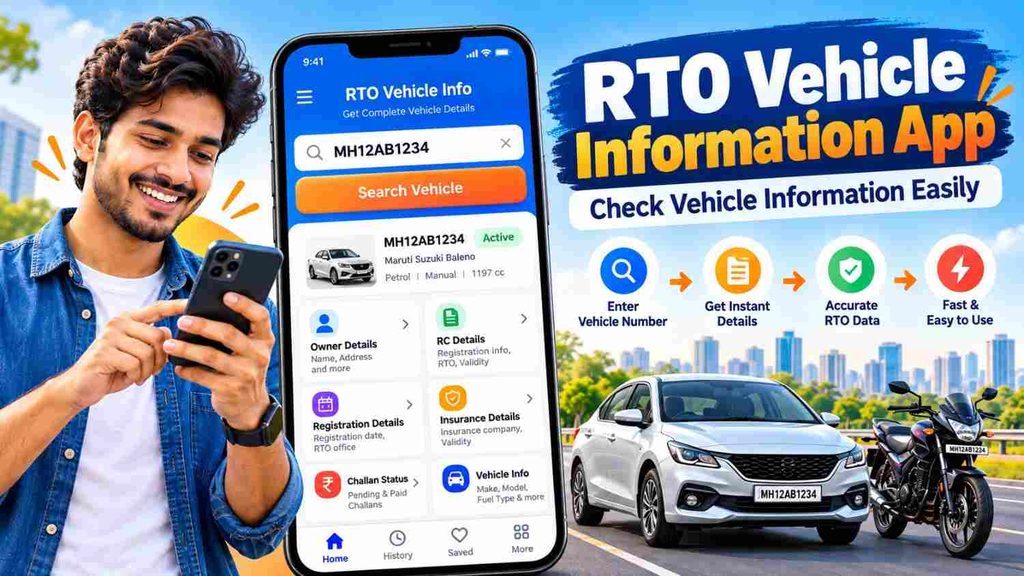
This guide explains how an RTO Vehicle Information App works, what details you may be able to check and how to use vehicle information safely and effectively.
What Is an RTO Vehicle Information App?
An RTO Vehicle Information App is a mobile-based service that helps users access available vehicle registration and transport-related information.
Every registered vehicle has a unique registration number displayed on its number plate. This number can be used to search for available vehicle records.
For example:
WB20AB1234
MH12CD5678
KA01XY9876
After entering the registration number, the app may display information related to the vehicle, depending on the records available.
Common details may include:
- Vehicle registration number
- Registration status
- Registration date
- Vehicle class
- Make and model
- Fuel type
- RC validity
- Insurance validity
- Fitness information
- Permit details
- PUC-related information
- Tax-related details
- Challan information
The exact information shown may vary depending on the vehicle, service and data availability.
RTO Vehicle Information App – Details You May Check
| Vehicle Information | Details You May Find |
|---|---|
| Registration Number | Vehicle’s registered number |
| Registration Status | Available RC or registration status |
| Registration Date | Date of vehicle registration |
| Vehicle Class | Car, bike, scooter, transport vehicle, etc. |
| Make & Model | Available manufacturer and model details |
| Fuel Type | Petrol, diesel, CNG, electric or other |
| RC Validity | Available registration validity information |
| Insurance | Available insurance validity details |
| Fitness | Fitness validity where applicable |
| Permit | Permit information for relevant vehicles |
| PUC | Available pollution certificate information |
| Challan | Pending challan information through supported services |
This makes an RTO Vehicle Information App useful for quick vehicle verification and document management.
How to Check Vehicle Information Easily
Checking vehicle information from a mobile phone is usually simple.
Step 1: Open a Reliable Vehicle Information Service
Start by opening a trusted RTO or vehicle information service on your phone.
For important verification, prefer a reliable platform rather than an unknown app that promises access to confidential owner data.
Step 2: Choose Vehicle Search
Look for an option such as:
- Vehicle Details
- RC Search
- Vehicle Search
- Registration Details
- Vehicle Information
Open the relevant section.
Step 3: Enter the Vehicle Number
Enter the complete vehicle registration number carefully.
For example:
DL01AB1234
Make sure every letter and number is correct. An incorrect registration number can result in no record or the wrong vehicle information.
Step 4: Complete Verification
Some vehicle information services may require:
- CAPTCHA
- OTP
- Mobile number verification
- Login
- Account authentication
Complete the required verification only on a trusted service.
Step 5: View Vehicle Information
Once the search is complete, available vehicle details may appear on your screen.
Check information such as:
- Registration status
- Registration date
- Vehicle class
- Fuel type
- Insurance validity
- Fitness details
- Permit information
- PUC
- Challans
Step 6: Compare Important Details
If you are checking a used car or bike, compare the digital information with the original documents shown by the seller.
This can help identify mismatched, outdated or incomplete information.
How to Check RC Information
RC stands for Registration Certificate and is one of the most important documents associated with a vehicle.
To check available RC information:
- Open the vehicle information app.
- Select the RC or vehicle search option.
- Enter the vehicle registration number.
- Complete the required verification.
- Review the available RC-related information.
RC information may help you check details such as registration status, registration date, vehicle category and other available records.
When buying a used vehicle, always compare digital RC information with the actual RC document.
How to Check Vehicle Insurance Information
Vehicle insurance is another important detail that may be available through a vehicle information search.
To check insurance information:
- Search the vehicle using its registration number.
- Open the vehicle details section.
- Look for insurance-related information.
- Check the available validity or expiry details.
An RTO Vehicle Information App may show basic insurance information, but it may not display complete policy details.
For complete information about:
- IDV
- Premium
- Coverage
- Deductibles
- Add-ons
- Roadside assistance
- Policy exclusions
check the actual insurance policy issued by the insurer.
How to Check Challan Information
Traffic challan information may also be available through relevant vehicle or challan services.
Depending on the platform, users may search using:
- Vehicle registration number
- Challan number
- Driving licence information
After completing the search, review available details such as the challan date, offence, payment status and amount.
Always use a trusted payment service before paying a challan and avoid suspicious payment links received through messages or unknown websites.
Benefits of Using an RTO Vehicle Information App
There are several reasons why vehicle owners and buyers may find an RTO Vehicle Information App useful.
Quick Access to Vehicle Information
Basic vehicle details can be checked from a smartphone without searching through multiple documents.
Useful for Used Vehicle Buyers
Before buying a second-hand car or bike, users can compare available digital information with the seller’s documents.
Helps Track Important Documents
Vehicle owners can review available RC, insurance, fitness and other information.
Easy Insurance Verification
Checking available insurance validity can help vehicle owners remember renewal requirements.
Convenient Challan Checking
Vehicle owners can look for pending challans through supported services.
Better Vehicle Management
Keeping track of vehicle-related information can make renewal, sale, transfer and document verification easier.
RTO Vehicle Information App for Used Car Buyers
Used car buyers should verify vehicle records before making payment.
Start by searching the vehicle number and reviewing available information.
Check:
- Registration status
- RC details
- Registration date
- Vehicle model
- Fuel type
- Insurance validity
- Pending challans
- PUC information
- Fitness details where applicable
- Ownership documents
The search can help with initial verification, but it should not replace physical inspection and original document checking.
Before completing a used car purchase, also inspect the vehicle’s condition and confirm that the required ownership transfer can be completed.
RTO Vehicle Information App for Used Bike Buyers
The same type of verification is useful when buying a second-hand motorcycle or scooter.
Before making payment:
- Check the registration number.
- Review available RC information.
- Verify insurance validity.
- Check pending challans.
- Review PUC details.
- Compare the vehicle with the seller’s documents.
- Check relevant identification details.
- Confirm ownership transfer requirements.
A used bike may appear affordable, but expired documents or unresolved ownership issues can create additional costs later.
Difference Between RC, Insurance and Challan Information
These three areas are related to a vehicle but serve different purposes.
RC Information
RC information is connected with the registration of the vehicle.
It may include:
- Registration number
- Registration date
- Vehicle class
- Fuel type
- Registration status
Insurance Information
Insurance provides financial protection according to the policy terms.
Insurance-related information may include policy validity, insurer details and other available information.
Challan Information
A challan is related to traffic violations or penalties recorded against a vehicle or driver.
Checking all three can provide a more complete picture of the vehicle.
Vehicle Information Not Showing? Possible Reasons
Sometimes users may not find the expected vehicle information.
Possible reasons include:
- Incorrect registration number
- Temporary server issue
- Slow internet connection
- Old vehicle records
- Recent data updates
- Recently renewed insurance not yet reflected
- Limited public data availability
- App maintenance
Check the vehicle number carefully and try again.
If the information is important for a vehicle purchase, compare it with original documents and another reliable source.
Safety Tips While Checking Vehicle Information
Vehicle information apps are convenient, but users should remain careful.
Follow these precautions:
- Use reliable apps and websites.
- Avoid unknown APK downloads.
- Never share OTPs with unknown people.
- Do not share banking passwords.
- Check payment pages before paying fees or challans.
- Avoid services claiming to reveal private or confidential owner information.
- Compare digital records with original documents.
- Keep screenshots containing personal information secure.
These simple precautions can reduce the risk of fraud and misleading information.
Frequently Asked Questions
1. What is an RTO Vehicle Information App?
It is a mobile-based service that can help users check available registration and transport-related vehicle information using a registration number.
2. Can I check vehicle information using the number plate?
Yes. The registration number displayed on the number plate can generally be used to search available vehicle information.
3. What details can I check using an RTO Vehicle Information App?
Depending on available records, you may check registration status, RC details, vehicle class, fuel type, insurance validity, fitness, permit, PUC and challan-related information.
4. Can I check RC information on mobile?
Yes. Available RC and registration-related information may be checked through a suitable vehicle information service.
5. Can I check vehicle insurance using the registration number?
Available insurance validity information may be displayed with vehicle records. For complete policy information, check the actual insurance document.
6. Can I check bike details using an RTO app?
Yes. Vehicle information searches may be used for motorcycles and scooters as well as cars.
7. Can I check pending challans?
Supported challan services may allow users to check available pending challans using the vehicle registration number.
8. Why is my vehicle information not showing?
Possible reasons include an incorrect registration number, server problems, old records, database update delays or limited data availability.
9. Is an RTO Vehicle Information App useful before buying a used vehicle?
Yes. It can help buyers compare available registration and vehicle information with the documents provided by the seller.
10. Is online vehicle information enough before buying a used car?
No. Online information should be used as part of the verification process. Buyers should also inspect original documents, vehicle condition and ownership transfer requirements.
Conclusion
An RTO Vehicle Information App – Check Vehicle Information Easily service can make vehicle verification more convenient for car and bike owners. By entering a vehicle registration number, users may be able to check RC information, registration status, insurance validity, fitness, permit, PUC and challan-related details directly from a mobile phone.
These services can be particularly helpful for used vehicle buyers, insurance checks and everyday vehicle document management.
However, online vehicle information should be treated as a verification tool rather than the only source of information. Before buying a used car or bike, compare the available digital details with the original RC, insurance policy, PUC certificate and other relevant documents, and make sure the ownership transfer process is completed correctly.