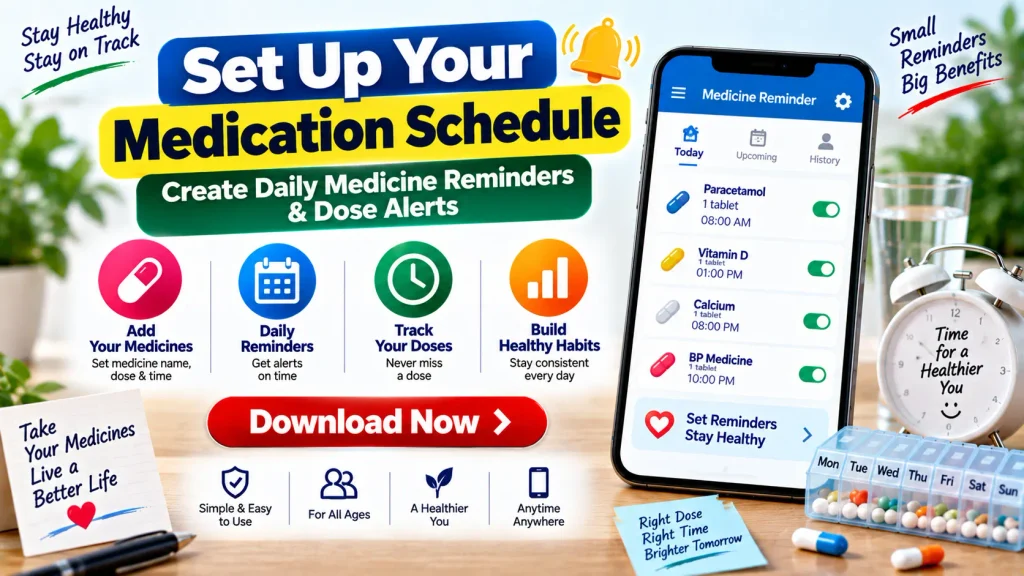
Set Up Your Medication Schedule – Create Daily Medicine Reminders & Dose Alerts
Remembering every medicine at the correct time can become difficult, especially when you have a busy schedule or take multiple medications at different times of the day. A simple medication schedule can help you organize your existing medicine routine and make it easier to remember scheduled doses.
Using a Medicine Reminder App, phone alarm, medication chart, or another reminder tool, you can create daily medicine reminders based on the instructions already provided by your doctor, pharmacist, or medicine label.
A medication schedule is an organizational tool. It should not be used to decide which medicine you need, how much you should take, or when you should change a prescribed dose. Those decisions should come from an appropriate healthcare professional.
What Is a Medication Schedule?
A medication schedule is an organized record of when and how you have been instructed to take your medicines.
Depending on your treatment plan, the schedule may include morning, afternoon, evening, or bedtime medicines. It can also include medicines that are taken on particular days rather than every day.
A simple schedule may contain the medicine name, prescribed dose, scheduled time, frequency, and any instructions you have been given about taking it with food or on an empty stomach.
Once you have the correct information, you can use mobile reminders or alarms to help you follow the schedule.
Daily Medication Schedule – Quick Overview
| Feature | Details |
|---|---|
| Main Purpose | Organize scheduled medicines |
| Reminder Options | Phone alarm or Medicine Reminder App |
| Schedule | Daily, selected days or as instructed |
| Common Times | Morning, afternoon, evening and bedtime |
| Multiple Medicines | Separate reminders can help organize them |
| Useful Information | Medicine name, dose, time and instructions |
| Dose Alerts | Notifications at scheduled times |
| Medication List | Keep it current when prescriptions change |
| Missed Dose | Follow medicine-specific instructions or ask a professional |
| Important | Do not change a prescribed schedule on your own |
Why Set Up Daily Medicine Reminders?
Even if you know exactly which medicines you need to take, it can still be easy to forget a dose during a busy day.
Daily medicine reminders provide a prompt at the scheduled time. Instead of relying entirely on memory, your phone can alert you when it is time to check your medication schedule.
Reminders can be particularly useful if you take multiple medicines, have different schedules during the day, or help organize medicines for a family member.
However, an alert is only a reminder. The medicine, dose, and timing should match the instructions you have already received.
How to Set Up Your Medication Schedule
Creating an organized medication routine does not have to be complicated. Follow these steps using your current medication instructions.
Step 1: Make a List of Your Medicines
Start by writing down all the medicines you currently use.
Your list may include prescription medicines, over-the-counter medicines, vitamins, and supplements.
For each item, record the medicine name and the instructions you have been given. Keeping this list updated can also make it easier to share accurate information with doctors and pharmacists.
Step 2: Check the Correct Dose
Look at your prescription label or other instructions to confirm the prescribed dose.
Do not guess a dose if you cannot remember it. If the directions are unclear, ask your doctor or pharmacist before creating the reminder.
Step 3: Record the Correct Time
Write down when each medicine should be taken.
For example, your existing instructions may specify a particular time of day or may say to take the medicine with meals, before food, or at another interval.
Do not change the timing simply to make your schedule more convenient without first checking with an appropriate healthcare professional.
Step 4: Add the Schedule to Your Phone
Once the information is correct, create reminders using your phone alarm, calendar, or a Medicine Reminder App.
Give each alert a clear label so you know which medicine the reminder refers to.
Step 5: Set Repeat Alerts
If a medicine is scheduled every day, you may be able to set the alert to repeat daily.
For a medicine taken only on certain days, select the appropriate days if your reminder tool supports this feature.
Always make the reminder match your actual medication instructions.
Step 6: Turn On Notifications
Make sure notifications and sounds are enabled.
If reminders do not appear, check your phone’s notification settings, silent mode, battery restrictions, and Do Not Disturb settings.
Step 7: Update Your Schedule
If a healthcare professional changes a medicine, dose, or timing, update your schedule immediately.
Delete outdated reminders so that an old notification does not cause confusion.
What Information Should a Medication Schedule Include?
A useful medication schedule should be simple enough to understand at a glance.
You may include:
- Medicine name
- Prescribed dose or strength
- Scheduled time
- Frequency
- Special instructions you were given
- Start or end date, when applicable
- Refill information, if useful
You can maintain this information on paper, in your phone, or through an appropriate medication reminder application.
Medicine Reminder App vs Phone Alarm
Both options can be useful.
A standard phone alarm is simple and may be enough if you only have one or two scheduled reminders. You can create an alarm, label it with the medicine name, and select the appropriate repeat days.
A dedicated Medication Reminder App may provide additional features such as multiple medicine profiles, dose alerts, reminder history, refill reminders, or the ability to mark a scheduled dose as taken.
Features vary between apps, so choose a system that is easy for you to understand and use consistently.
How to Organize Multiple Medicines
If you take several medicines, create a separate entry for each one rather than using a vague reminder such as “Take Medicine.”
Clear labels can reduce confusion.
You can also create a medication chart with separate sections for morning, afternoon, evening, and bedtime.
Some people use pill organizers as an additional organizational tool. However, not every medicine is suitable for storage outside its original container, so check with your pharmacist if you are uncertain.
Can Caregivers Use Medication Reminders?
Yes. A medication schedule can also help a caregiver organize medicines for a family member.
The caregiver can maintain an updated medicine list and use alarms or notifications based on the person’s current instructions.
If a doctor changes the medication plan, both the written schedule and digital reminders should be updated.
Caregivers should not independently change doses or stop prescribed medicines without appropriate professional guidance.
What If You Miss a Scheduled Dose?
Missing a reminder does not mean there is one universal action that applies to every medicine.
Different medicines can have different missed-dose instructions. Do not automatically double the next dose to compensate for a missed one.
Check the medicine instructions. If you are uncertain about what to do, contact your doctor or pharmacist for guidance specific to that medicine.
Medication Schedule Safety Tips
Read medication labels carefully and follow the directions you have been given.
Keep your medication list current, especially after a new prescription, dose change, or discontinued medicine.
Do not share prescription medicines with another person.
Avoid changing the dose, timing, or frequency based only on information from an app or general website.
Store medicines according to their instructions and keep them safely away from children.
If you experience an unexpected reaction or have questions about side effects or interactions, contact an appropriate healthcare professional.
Frequently Asked Questions (FAQ)
1. What is a medication schedule?
A medication schedule is an organized record of when and how you have been instructed to take your medicines.
2. How can I set daily medicine reminders?
You can use a phone alarm, calendar notification, medication chart, or Medicine Reminder App to create alerts that match your existing medication instructions.
3. Can I create reminders for multiple medicines?
Yes. Many phones and reminder apps allow multiple alerts. Creating a clearly labeled reminder for each medicine can make the schedule easier to follow.
4. What should I include in my medication list?
Include your medicine names, prescribed doses, scheduled times, frequency, and relevant instructions. Prescription medicines, over-the-counter products, vitamins, and supplements should also be included when maintaining a complete medication list.
5. Can I change my medicine time to fit my routine?
Do not change a prescribed medication schedule without checking whether the change is appropriate. Ask your doctor or pharmacist if you need to adjust the timing.
6. What happens if I miss a dose?
The correct action depends on the specific medicine. Follow its instructions or contact your doctor or pharmacist if you are unsure. Do not automatically double a later dose.
7. Is a Medicine Reminder App medical advice?
No. A reminder app is an organizational tool and does not replace advice from a qualified healthcare professional.
8. Should I update my reminders when my prescription changes?
Yes. Update or remove old reminders whenever your medication instructions change so that your schedule reflects your current treatment plan.
Final Words
Setting up a daily medication schedule can make it easier to organize medicine times and remember scheduled doses. A phone alarm, medication chart, or Medicine Reminder App can provide useful alerts throughout the day.
Start with an accurate list of your medicines, confirm the prescribed dose and timing, and create reminders that match those instructions. Keep your medication list and alerts updated whenever your treatment plan changes.
Most importantly, use reminders only to organize instructions you have already received. Do not use an app to independently change a medicine, dose, frequency, or treatment schedule.
Disclaimer: This article is for general informational and educational purposes only. It is not medical advice and does not provide diagnosis or treatment. Always follow the medication instructions provided by your doctor, pharmacist, prescription label, or other qualified healthcare professional. If you are unsure about a medicine, dose, interaction, side effect, or missed dose, seek professional medical advice.