How to Download Driving License Online – Complete Step-by-Step Guide
A driving license is one of the most important documents for anyone who drives a motor vehicle. It serves as legal proof that you are authorized to operate a vehicle on public roads. In today’s digital era, government transport departments have made it easier than ever to access important documents online, including driving licenses. Instead of visiting government offices and waiting in long queues, drivers can now download a digital copy of their driving license from official online platforms.
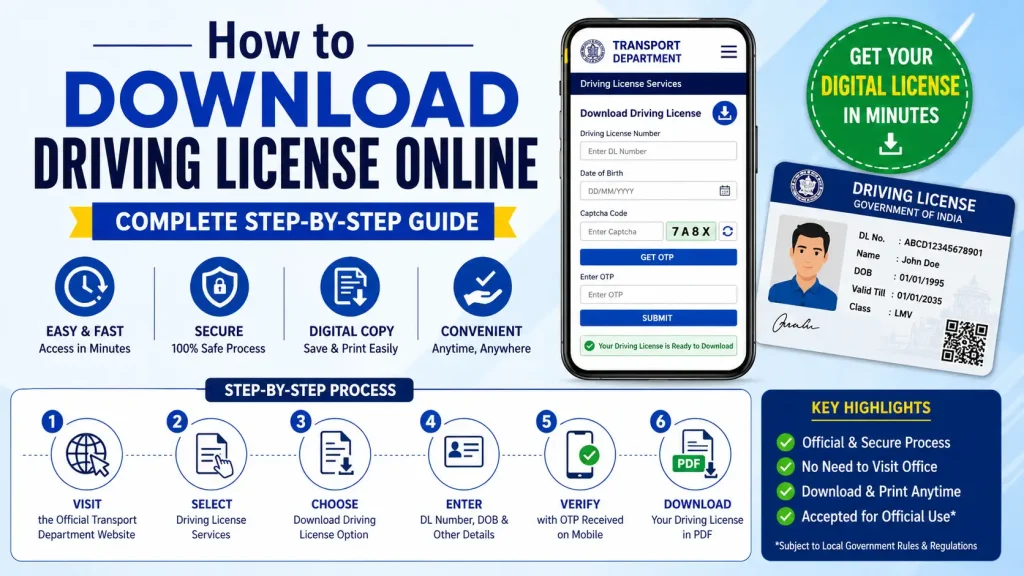
Whether you need a digital copy for verification, travel, or record-keeping purposes, downloading your driving license online is a simple and convenient process. This guide explains everything you need to know about downloading a driving license online, including eligibility, requirements, step-by-step instructions, benefits, common issues, and frequently asked questions.
What Is a Digital Driving License?
A digital driving license is an electronic version of your physical driving license that can be accessed through official government portals and approved digital document platforms. It contains the same information as the physical card, including:
- License number
- Driver’s name
- Date of birth
- Address
- Vehicle categories authorized
- Issue date
- Expiry date
- Issuing authority
In many regions, a digitally issued driving license is considered legally valid when presented through authorized government applications.
Benefits of Downloading Your Driving License Online
Downloading your driving license online offers several advantages.
| Benefit | Description |
|---|---|
| Instant Access | Get your license anytime without visiting an office. |
| Convenience | Download from home using a computer or smartphone. |
| Secure Storage | Keep a backup copy in digital format. |
| Faster Verification | Easily share or display your license when required. |
| Paperless Process | Supports digital governance initiatives. |
| Emergency Backup | Access your license even if the physical copy is lost. |
These benefits make digital driving licenses increasingly popular among drivers.
Who Can Download a Driving License Online?
Generally, you can download your driving license online if:
- Your driving license has already been issued.
- Your license details are available in the government database.
- You have the required identification information.
- Your license is valid and active.
If your application is still under processing, the download option may not yet be available.
Information Required Before Downloading
Before starting the process, keep the following details ready.
| Required Information | Purpose |
|---|---|
| Driving License Number | License identification |
| Date of Birth | Identity verification |
| Registered Mobile Number | OTP verification |
| Application Number (if applicable) | Application tracking |
| Internet Connection | Access online portal |
Having these details available will help you complete the process smoothly.
Step-by-Step Guide to Download Driving License Online
The exact process may vary depending on your country or state, but the following steps represent the standard procedure used by most transport authorities.
Step 1: Visit the Official Transport Department Website
Open the official website of your government transport department or licensing authority.
Always ensure that you are using the official government portal to protect your personal information and avoid fraudulent websites.
Step 2: Navigate to Driving License Services
After reaching the homepage:
- Locate the Driving License section.
- Select “Driving License Services.”
- Choose the option related to downloading or viewing your driving license.
Many portals provide dedicated services for license-related activities.
Step 3: Select Download Driving License
Look for options such as:
- Download Driving License
- Print Driving License
- View Driving License
- Download Digital License
Click the appropriate option to proceed.
Step 4: Enter Required Details
You may be asked to provide:
- Driving License Number
- Date of Birth
- Application Number
- Registered Mobile Number
Ensure all information matches the records maintained by the licensing authority.
Incorrect details may prevent access to your license.
Step 5: Complete OTP Verification
For security purposes, many online systems use One-Time Password (OTP) verification.
The process generally includes:
- Receiving an OTP on your registered mobile number.
- Entering the OTP on the verification page.
- Confirming your identity.
This step helps protect personal information from unauthorized access.
Step 6: View License Details
Once verification is completed, the system displays your driving license information.
Review details carefully, including:
- Full name
- License number
- Vehicle classes
- Issue date
- Expiry date
- Current status
If any information appears incorrect, contact the relevant licensing authority.
Step 7: Download the License
Most portals provide a download button that allows you to save the document as a PDF.
After downloading:
- Save the file securely.
- Create backup copies if needed.
- Store it in your smartphone or cloud storage.
Many users also keep a printed copy for convenience.
Alternative Ways to Access a Digital Driving License
Many governments now support digital document applications that allow users to store and access official documents electronically.
Common digital document platforms may allow you to:
- Link your driving license.
- View digital copies.
- Share documents electronically.
- Access licenses without carrying physical copies.
Always use government-approved applications for maximum security and legal validity.
How to Download a Duplicate Driving License
If your original license has been lost, damaged, or stolen, you may be able to obtain a duplicate copy online.
The process generally includes:
- Logging into the transport department portal.
- Selecting Duplicate Driving License services.
- Completing identity verification.
- Paying applicable fees.
- Submitting the request.
- Downloading the temporary or digital version if available.
Some jurisdictions may require additional verification before issuing a duplicate license.
Common Problems While Downloading a Driving License
Users occasionally encounter issues during the download process.
License Not Found
Possible reasons include:
- Incorrect license number.
- Recently issued license not yet updated.
- Data synchronization delays.
Double-check your information and try again later.
OTP Not Received
Common causes include:
- Network issues.
- Incorrect mobile number.
- Mobile number not linked to the license.
Wait a few minutes and request a new OTP if necessary.
Website Errors
Government websites may occasionally experience:
- Heavy traffic
- Maintenance updates
- Technical interruptions
Try accessing the portal during non-peak hours.
Incorrect Personal Information
If your license displays incorrect details, contact the licensing authority immediately to request corrections.
Safety Tips When Downloading Driving License Online
Protect your personal information by following these recommendations:
| Safety Tip | Importance |
|---|---|
| Use official government websites | Prevent fraud and identity theft |
| Avoid public Wi-Fi networks | Protect sensitive information |
| Never share OTPs | Maintain account security |
| Verify website authenticity | Prevent phishing attempts |
| Store downloaded files securely | Protect personal records |
Following these precautions can help ensure a safe online experience.
Why Keeping a Digital Driving License Is Useful
A digital driving license can be extremely valuable in everyday situations.
Benefits include:
- Quick access during traffic inspections.
- Backup when the physical card is unavailable.
- Easy document management.
- Convenient travel preparation.
- Reduced risk of losing important records.
As digital governance continues to expand, electronic documents are becoming increasingly accepted and widely used.
Conclusion
Downloading a driving license online is a simple, secure, and convenient process that allows drivers to access their license information anytime and anywhere. By using official government portals and authorized digital document platforms, you can quickly obtain a digital copy of your driving license without visiting a transport office.
Whether you need a backup copy, require immediate access to your license, or simply want a paperless solution, online driving license download services provide an efficient way to manage your documents. Always ensure that your personal information is accurate, use secure internet connections, and rely only on official government platforms for downloading and storing your driving license.
Frequently Asked Questions (FAQ)
1. Can I download my driving license online?
Yes. If your driving license has been issued and is available in the government database, you can typically download a digital copy through the official transport department portal.
2. Is a digital driving license legally valid?
In many jurisdictions, digital driving licenses issued through approved government platforms are legally recognized. Always check local regulations.
3. What information is required to download a driving license?
You generally need your driving license number, date of birth, registered mobile number, and sometimes an application number.
4. Can I download my driving license as a PDF?
Yes. Most online portals provide a downloadable PDF version of the driving license or allow users to access it through digital document services.
5. What should I do if I forget my driving license number?
You may be able to retrieve your license information using your registered mobile number, application details, or by contacting the licensing authority.
6. Why is my driving license not showing online?
Possible reasons include incorrect information, database update delays, pending application processing, or technical issues with the portal.
7. Can I use my mobile phone to download my driving license?
Yes. Most official transport websites and government document applications are mobile-friendly and support smartphone access.
8. Is there any fee for downloading a driving license online?
In many cases, downloading a digital copy is free. However, duplicate license requests or certain services may involve fees.
9. What should I do if my downloaded license contains incorrect information?
Contact the issuing transport authority immediately and request correction of the records.
10. Can I download a duplicate driving license online if my original license is lost?
Many transport departments provide online duplicate license services that allow eligible users to apply for and obtain replacement licenses through official portals.